
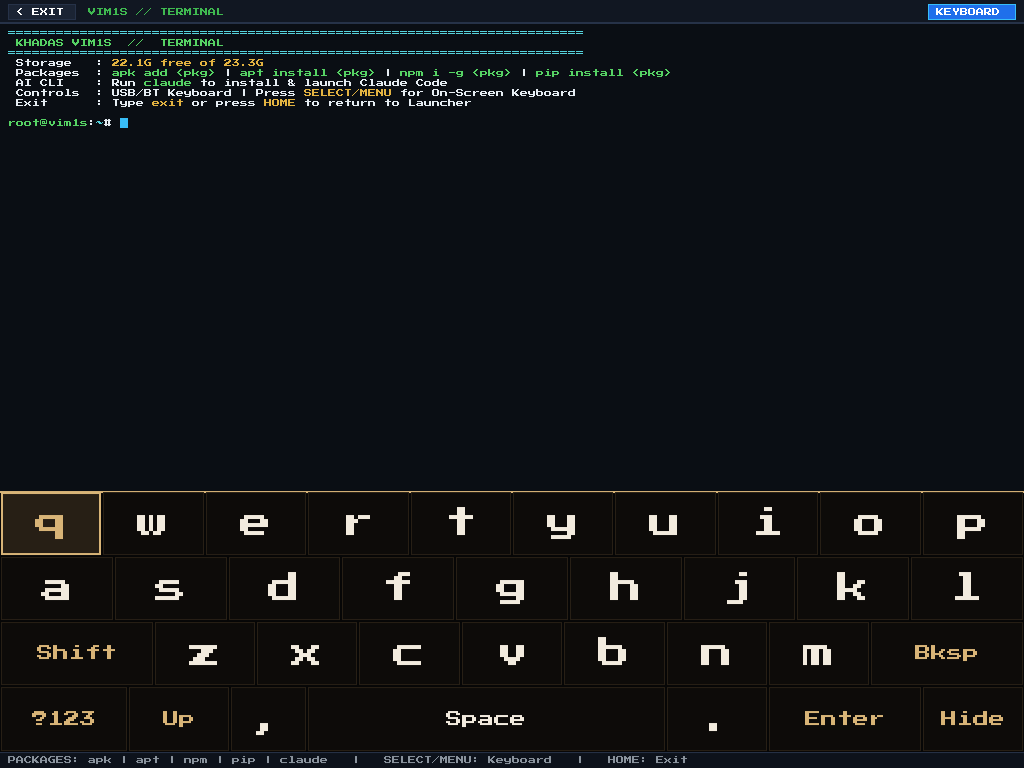
VIM1S Root Terminal — Built-In Cyberdeck Linux Shell & Persistent microSD Toolchain (Beginner Guide)
Why VIM1S Terminal Is the Best Place for Beginners to Learn Linux
Many beginners are afraid of opening a Linux Terminal because one wrong command on a normal PC can break the operating system.
On the Khadas VIM1S 32 MB SPI RAM-OS, you cannot break the system even if you try!
- The core operating system boots fresh into
LPDDR4RAM on every power-up, while the internal32 MBSPI NOR and16 GBeMMC remain completely untouched (0writes). If you ever mess up a temporary system folder in RAM, simply reboot and the OS is 100% factory-clean in9.78 seconds! - At the same time, when you open Card [8] Terminal (
terminal-session), VIM1S mounts your personal persistent workspace on your microSD card (/mnt/saves/terminal/root,/mnt/saves/terminal/local/bin,npm-global) so your own scripts, downloads, and installed developer tools stay saved! When you exit the Terminal,storage-mountflushes everything cleanly and re-locks the microSD card read-only.
8 Fun & Useful First Commands for Beginners
Open [8] Terminal (type with a USB/Bluetooth keyboard, or press F1 / SELECT to use the controller On-Screen Keyboard) and try these safe commands:
| Command | What It Shows You |
|---|---|
uname -a | Shows your Linux 7.0+ ARM64 (aarch64) kernel running on Khadas VIM1S |
free -m | Shows how little RAM the entire OS uses (~1,750 MiB free out of 2,048 MiB!) |
df -h | Shows your RAM filesystem (/) and your microSD card (/mnt/saves) |
ls -la /mnt/saves/docs | Lists the plain-text .txt, .asc, and .nfo files created in VIM1S Writer |
ls -la /mnt/saves/music | Lists the .mid, .wav, .mml, and .abc songs created in VIM1S MIDI Studio |
cat /proc/mounts | Proves how eMMC and microSD partitions are mounted safely |
ip addr | Displays your current wlan0 Wi-Fi or eth0 LAN IPv4 address |
exit | Closes the Terminal, syncs your microSD workspace, and returns to the Launcher |
Frequently Asked Questions (Beginner FAQ)
- How fast does VIM1S Terminal render?
vim1s-terminal is written in pure C11 directly on Wayland wl_shm using an embedded bitmap glyph renderer — zero X11, zero GTK/Qt, opening in under 20 milliseconds!
Explore All Khadas VIM1S Programs — Beginner Guides
Every built-in application on the Khadas VIM1S 32 MB SPI RAM-OS runs 100% in LPDDR4 RAM with zero writes to the internal SPI NOR or eMMC chips. Everything you save is written exclusively and atomically to your removable microSD card:
- Khadas VIM1S Console OS Hub & Downloads — Download the
32 MBSPI RAM-OS (9.78 sboot), USB/eMMC image, and step-by-step flashing guide. - VIM1S Retro MIDI Studio — Visual note-based MIDI music editor & chiptune/FM synthesizer with
.mid,.wav,.mml, and.abcmicroSD export. - VIM1S Pure-ASCII Writer — Distraction-free plain-text word processor with Word-style toolbar buttons (no Markdown needed!) and
.txt,.asc,.nfomicroSD export. - VIM1S Games & Couch Launcher — Play retro ROMs and native 64-bit ARM64 strategy ports straight from RAM with crash-safe microSD savegames.
- VIM1S Movies — Hardware AV1 Player — Silent, zero-CPU
1080p60hardware video player forAV1,HEVC/H.265,VP9, andH.264movies on microSD. - VIM1S Email Client — Fast, tracking-free plain-text
IMAP / POP3 / SMTPTLS mail client with attachments and optional AI reply drafting. - VIM1S Personal Profile — Offline microSD identity and automatic signature manager with zero cloud accounts.
- VIM1S Web Browser — RAM-isolated Firefox ESR with hardware
AV1streaming, PDF reader, and couch bookmark tiles. - VIM1S Root Terminal — Built-in Wayland Linux command-line shell with a persistent microSD developer toolchain.
- VIM1S Wi-Fi Setup — Dual-band
2.4 GHz / 5 GHz(AP6256) wireless setup with encrypted0600microSD credential persistence. - VIM1S Bluetooth Pairing — Pair
Bluetooth 5.0gamepads, keyboards, and speakers in seconds. - VIM1S Wireless Screencast — Turn your TV into a low-latency Miracast wireless display receiver for phones and laptops.
- VIM1S Settings & 10 Cyberdeck Themes — Switch
1080p / 720pHDMI modes, HDMI audio, 10 CRT colour palettes, and home screen cards.