
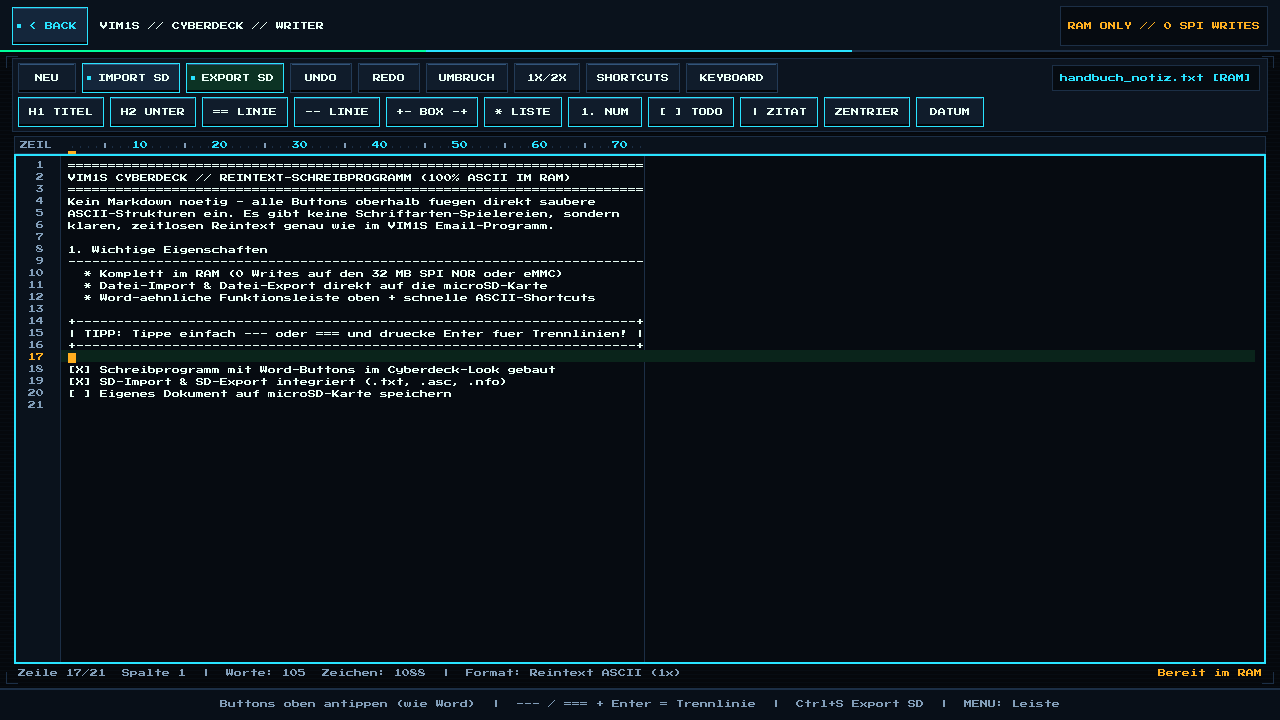
VIM1S Pure-ASCII Writer — Distraction-Free Plain-Text Word Processor (.TXT, .ASC, .NFO) Without Markdown
What Is VIM1S Pure-ASCII Writer? (Write Like Word — Zero Fonts, Zero Markdown, 100% Plain Text)
Modern word processors bury your thoughts under dozens of incompatible fonts, hidden XML stylesheets, cloud popups, and proprietary file formats. Meanwhile, programmer text editors force you to memorize Markdown (###, **, >) just to structure a simple document.
VIM1S Pure-ASCII Writer (vim1s-writer) combines the best of both worlds:
- 100% Pure Plain Text (No Fonts, No Hidden Codes): Just like the classic text composer inside VIM1S Email, every character on the page is crisp, timeless 7-bit ASCII rendered on an
8x8pixel grid (1xor2xzoom). Any file you write will still open identically 50 years from now on Windows, macOS, Linux, DOS, Amiga, or any smartphone. - Familiar Word-Style Button Ribbon Above the Page: You never need to know Markdown! Want a bold section banner, a horizontal divider rule, a framed callout box, a numbered list, or a to-do checkbox? Simply click the button at the top of the screen!
- 100% RAM Execution & MicroSD-Only Storage: Your live document and 12-step Undo/Redo ring live strictly in
LPDDR4RAM (zero writes to the 32 MB SPI NOR or eMMC chips). Importing and exporting works exclusively with your microSD card in.txt,.asc, and.nfo.
Every Toolbar Button Explained for Beginners
Above the 72-column typewriter ruler sit two clean rows of Cyberdeck buttons:
Top Row — Document & View Actions
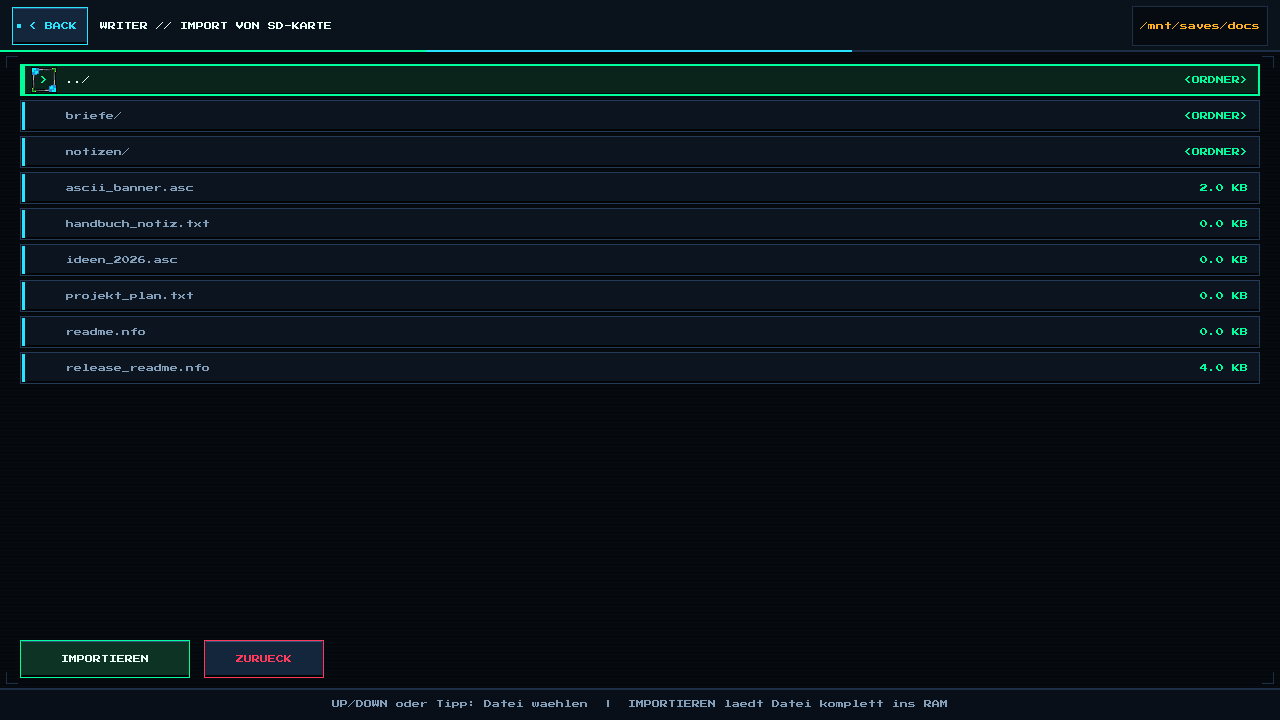
NEU(Ctrl+N): Clears the RAM canvas for a fresh note (recording an Undo snapshot first so nothing is lost by accident).IMPORT SD(Ctrl+O): Opens the microSD file browser (/mnt/saves/docs) to load any.txt,.asc, or.nfofile into RAM.EXPORT SD(Ctrl+S): Saves your document atomically onto your microSD card as.txt,.asc, or.nfo.UNDO/REDO(Ctrl+Z/Ctrl+Y): Step backward and forward through up to 12 full document snapshots in RAM.UMBRUCH(Ctrl+W/F9): Cleanly word-wraps the current paragraph to72columns without breaking words in half.1X/2X: Switches between compact overview text (1x) and large couch-friendly2xbitmap characters.SHORTCUTS: Displays the built-in German/ASCII shortcut reference sheet.KEYBOARD(F1): Toggles the controller/touch On-Screen Keyboard (OSK) at the bottom of the screen.
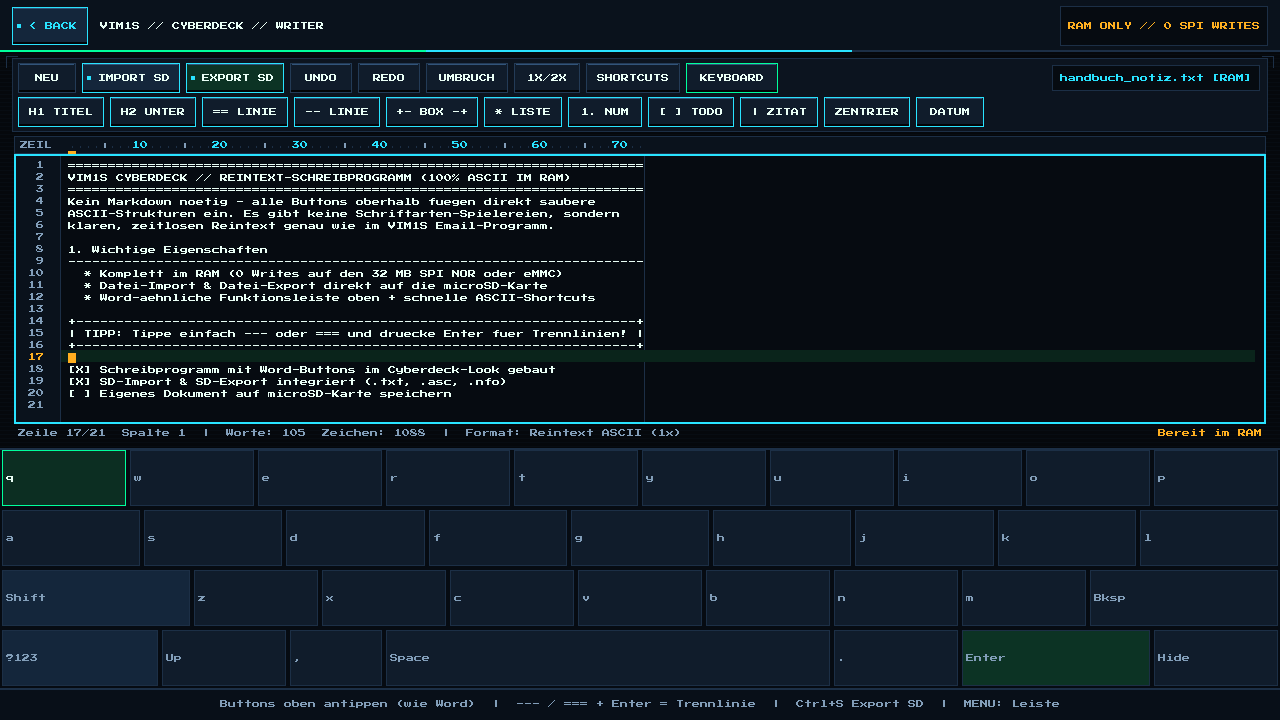
Second Row — 1-Click Pure-ASCII Formatting Buttons (No Markdown Required!)
H1 TITEL(Ctrl+H/F2): Turns your current line into an uppercase main banner framed by double====lines.H2 UNTER(Ctrl+U/F3): Underlines your current section heading with a clean----bar.LINIE(Ctrl+D/F5) &-- LINIE(Ctrl+L/F4): Inserts a full-width 72-column double (==) or single (----) divider bar.+- BOX -+(Ctrl+B/F6): Wraps your text inside a classic+------+/| text |/+------+ASCII frame — automatically word-wrapping long sentences across multiple box rows so not a single word is ever cut off!LISTE&1. NUM: Toggles clean indented bullet lists (1.,2.,3.). PressingEntercontinues the list automatically; pressingEnteron an empty item exits the list cleanly![ ] TODO(Ctrl+T/F7): Cycles a line through open task[ ], completed task[X], and plain text.| ZITAT: Prefixes the line with a clean vertical quote bar (|).ZENTRIER(Ctrl+E/F8): Centers your current heading or title across the 72-column page width using pure spaces.DATUM: Stamps the current local date and time ([YYYY-MM-DD HH:MM]) at your cursor.
Fast Typewriter Auto-Shortcuts (Type + Press Enter)
Prefer keeping your hands on a USB or Bluetooth keyboard? Type any of these short triggers on a line and press Enter:
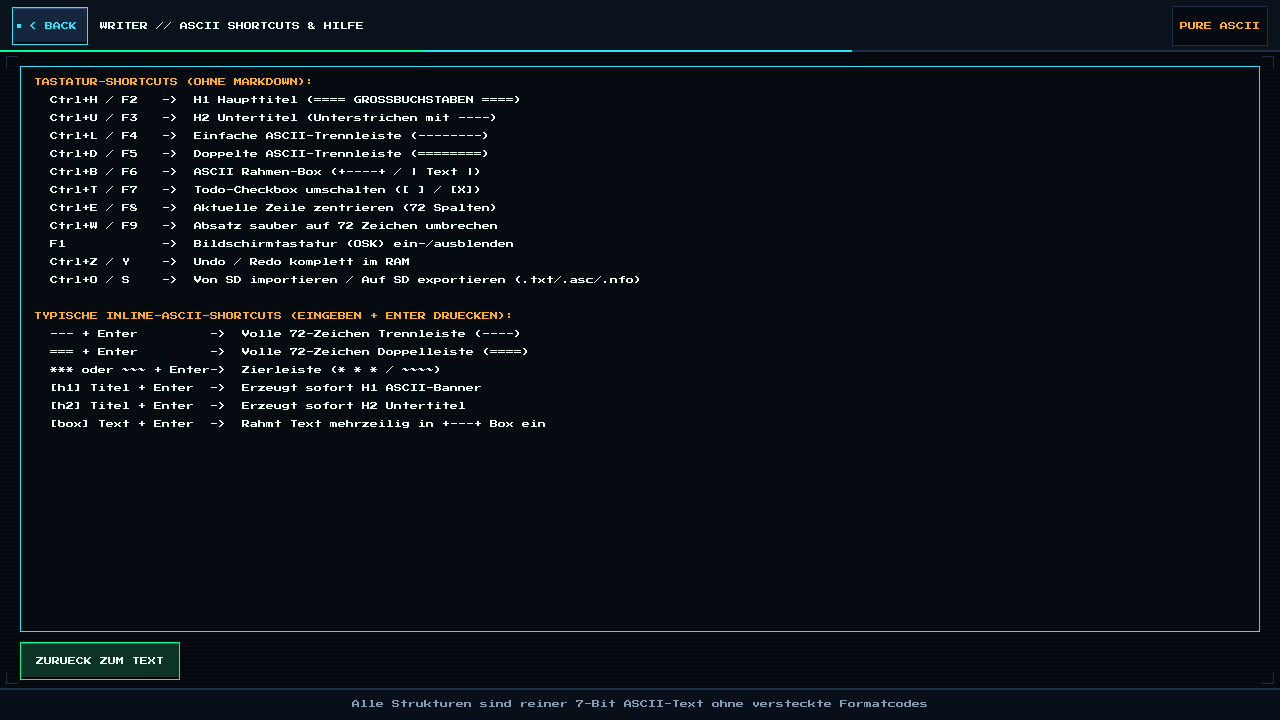
What You Type + Enter | What VIM1S Writer Creates Automatically |
|---|---|
--- + Enter | Full 72-character single divider bar (------------------------------------------------------------------------) |
=== + Enter | Full 72-character double divider bar (================) |
* or ~~~ + Enter | Decorative star ( ) or wave ( |
[h1] My Title + Enter | Full uppercase ==== H1 ASCII banner |
[h2] Chapter 1 + Enter | Underlined ---- H2 section header |
[box] Important note + Enter | Framed +---+ / | Important note | / +---+ box |
Supported MicroSD File Formats: .TXT, .ASC, and .NFO
When you click EXPORT SD, you can pick between the three classic pure-text standards — all written atomically to /mnt/saves/docs/ on your microSD card:
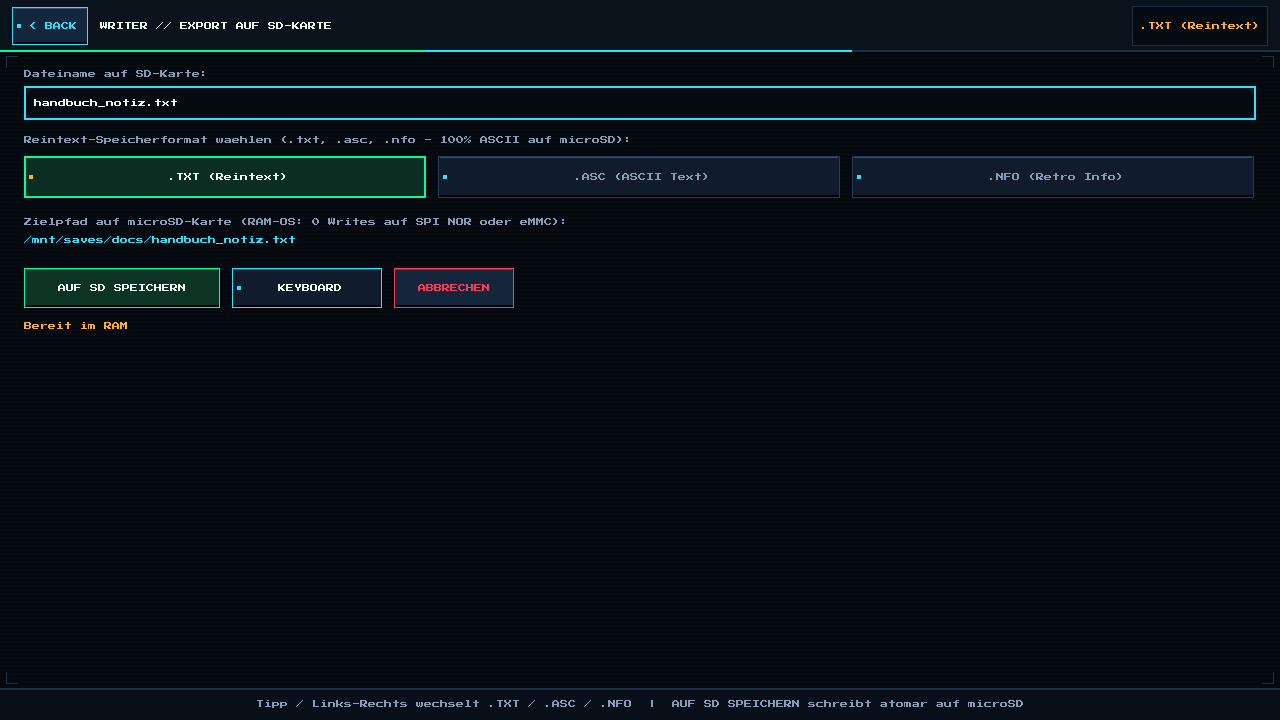
.TXT(Universal Plain Text): Opens everywhere — Notepad, TextEdit, Linux editors, VIM1S Email attachments, smartphones, and e-readers..ASC(ASCII Document / Banner Text): The traditional extension for structured 72/80-column ASCII documents, BBS manuals, and PGP-ready plain text..NFO(Retro Release & Info File): Famous from classic PC software, demoscene releases, and retro game manuals! Even better: when you import an existing.nfoor.txtfile from your microSD card, VIM1S Writer automatically converts UTF-8 umlauts (ä -> ae,ß -> ss), legacy ISO-8859-1 files, and classic DOS CP437 box-drawing art cleanly into crisp 7-bit ASCII!
Frequently Asked Questions (Beginner FAQ)
- What happens if no microSD card is inserted when I click Save?
Because VIM1S is a strict RAM-OS that never writes to internal flash chips, Writer will politely remind you to insert a microSD card while keeping your text safely open in RAM until you insert one.
- Can I control VIM1S Writer with just a gamepad or TV remote?
Yes! Press MENU / START to highlight any Word-style toolbar button with the D-pad, and press Y (or F1) to open the On-Screen Keyboard for couch typing.
Explore All Khadas VIM1S Programs — Beginner Guides
Every built-in application on the Khadas VIM1S 32 MB SPI RAM-OS runs 100% in LPDDR4 RAM with zero writes to the internal SPI NOR or eMMC chips. Everything you save is written exclusively and atomically to your removable microSD card:
- Khadas VIM1S Console OS Hub & Downloads — Download the
32 MBSPI RAM-OS (9.78 sboot), USB/eMMC image, and step-by-step flashing guide. - VIM1S Retro MIDI Studio — Visual note-based MIDI music editor & chiptune/FM synthesizer with
.mid,.wav,.mml, and.abcmicroSD export. - VIM1S Pure-ASCII Writer — Distraction-free plain-text word processor with Word-style toolbar buttons (no Markdown needed!) and
.txt,.asc,.nfomicroSD export. - VIM1S Games & Couch Launcher — Play retro ROMs and native 64-bit ARM64 strategy ports straight from RAM with crash-safe microSD savegames.
- VIM1S Movies — Hardware AV1 Player — Silent, zero-CPU
1080p60hardware video player forAV1,HEVC/H.265,VP9, andH.264movies on microSD. - VIM1S Email Client — Fast, tracking-free plain-text
IMAP / POP3 / SMTPTLS mail client with attachments and optional AI reply drafting. - VIM1S Personal Profile — Offline microSD identity and automatic signature manager with zero cloud accounts.
- VIM1S Web Browser — RAM-isolated Firefox ESR with hardware
AV1streaming, PDF reader, and couch bookmark tiles. - VIM1S Root Terminal — Built-in Wayland Linux command-line shell with a persistent microSD developer toolchain.
- VIM1S Wi-Fi Setup — Dual-band
2.4 GHz / 5 GHz(AP6256) wireless setup with encrypted0600microSD credential persistence. - VIM1S Bluetooth Pairing — Pair
Bluetooth 5.0gamepads, keyboards, and speakers in seconds. - VIM1S Wireless Screencast — Turn your TV into a low-latency Miracast wireless display receiver for phones and laptops.
- VIM1S Settings & 10 Cyberdeck Themes — Switch
1080p / 720pHDMI modes, HDMI audio, 10 CRT colour palettes, and home screen cards.