
VIM1S Profile — Local microSD Personal Identity, Email Signatures & Zero-Cloud Privacy Guide
What Is VIM1S Profile? (Your Identity on Your microSD Card — Never in the Cloud)
On conventional operating systems (Windows, macOS, Android, iOS), setting up a device forces you to sign into a corporate cloud account that syncs your name, phone number, and habits to remote servers.
VIM1S Profile (vim1s-profile) — Card [11] Profile on the Khadas VIM1S Console OS — flips that model upside down:
- 100% Offline & MicroSD-Only: Your profile lives in a simple, human-readable configuration file (
/mnt/saves/profile/profile.conf) on your removable microSD card. - Zero Internal Chip Writes: Nothing is ever written to the VIM1S
32 MBSPI NOR or16 GBeMMC. Swap microSD cards and you swap identities instantly! - Automatic Signature & Local Context: When you compose a message in VIM1S Email or ask ZCode AI to draft a formal letter, your local Profile supplies your name, role, preferred tone, and signature automatically so you never have to retype them.
Step-by-Step Beginner Guide: Setting Up Your Profile
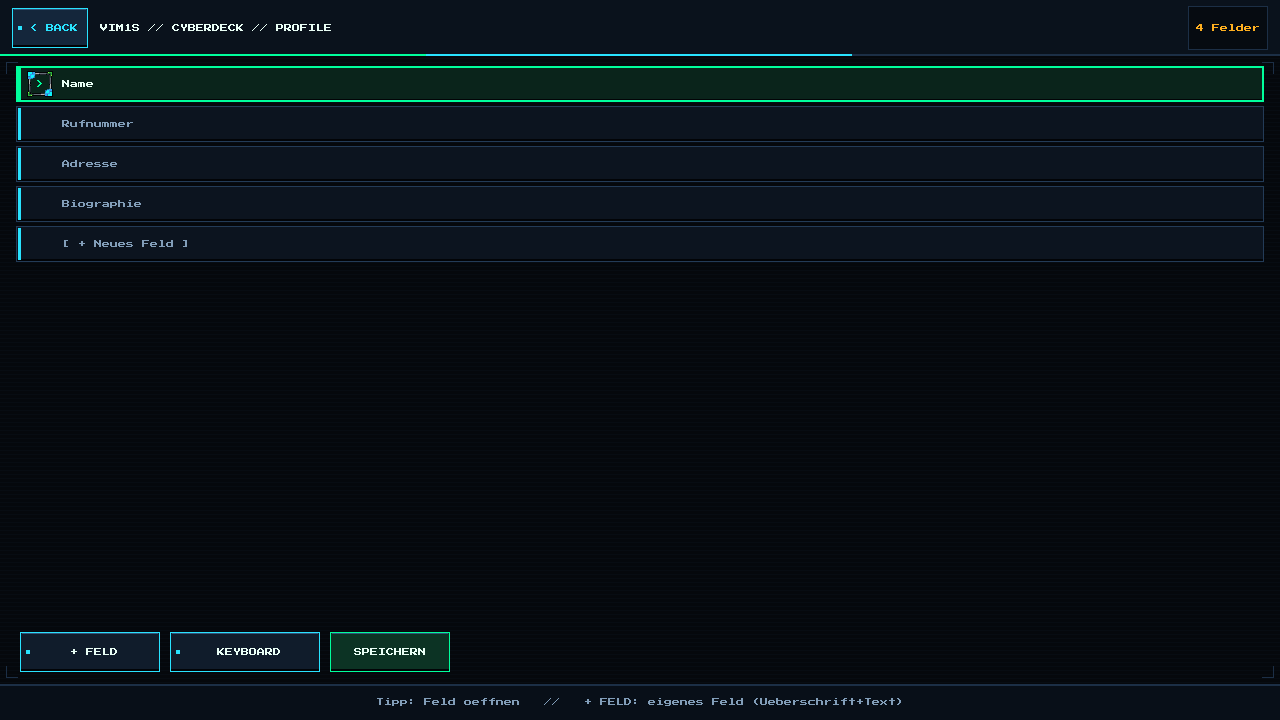
- Open Profile: Select [11] Profile on the Home Screen.
- Fill Only What You Want: Every field is completely optional:
- Name / Display Name (used as sender display name & signature sign-off)
- Email / Phone / City or Address (for formal business or support replies)
- Role / Short Bio / Signature (appended cleanly to outgoing emails)
- Add Custom Fields (
+ FELD): Need to store a project URL, PGP fingerprint, club membership number, or writing style preference? Tap+ FELDto add custom key-value blocks! - Tap
SPEICHERN: VIM1S briefly unlocks your microSD card viastorage-mount saves_open_rw, writesprofile.confatomically, syncs, and immediately re-locks the microSD card read-only!
Frequently Asked Questions (Beginner FAQ)
- Is an internet connection required to use VIM1S Profile?
No — VIM1S Profile has zero network code and never connects to the internet.
- Can I edit
profile.confin VIM1S Writer too?
Yes! Because profile.conf is clean plain text on your microSD card, you can inspect or back it up anytime.
Explore All Khadas VIM1S Programs — Beginner Guides
Every built-in application on the Khadas VIM1S 32 MB SPI RAM-OS runs 100% in LPDDR4 RAM with zero writes to the internal SPI NOR or eMMC chips. Everything you save is written exclusively and atomically to your removable microSD card:
- Khadas VIM1S Console OS Hub & Downloads — Download the
32 MBSPI RAM-OS (9.78 sboot), USB/eMMC image, and step-by-step flashing guide. - VIM1S Retro MIDI Studio — Visual note-based MIDI music editor & chiptune/FM synthesizer with
.mid,.wav,.mml, and.abcmicroSD export. - VIM1S Pure-ASCII Writer — Distraction-free plain-text word processor with Word-style toolbar buttons (no Markdown needed!) and
.txt,.asc,.nfomicroSD export. - VIM1S Games & Couch Launcher — Play retro ROMs and native 64-bit ARM64 strategy ports straight from RAM with crash-safe microSD savegames.
- VIM1S Movies — Hardware AV1 Player — Silent, zero-CPU
1080p60hardware video player forAV1,HEVC/H.265,VP9, andH.264movies on microSD. - VIM1S Email Client — Fast, tracking-free plain-text
IMAP / POP3 / SMTPTLS mail client with attachments and optional AI reply drafting. - VIM1S Personal Profile — Offline microSD identity and automatic signature manager with zero cloud accounts.
- VIM1S Web Browser — RAM-isolated Firefox ESR with hardware
AV1streaming, PDF reader, and couch bookmark tiles. - VIM1S Root Terminal — Built-in Wayland Linux command-line shell with a persistent microSD developer toolchain.
- VIM1S Wi-Fi Setup — Dual-band
2.4 GHz / 5 GHz(AP6256) wireless setup with encrypted0600microSD credential persistence. - VIM1S Bluetooth Pairing — Pair
Bluetooth 5.0gamepads, keyboards, and speakers in seconds. - VIM1S Wireless Screencast — Turn your TV into a low-latency Miracast wireless display receiver for phones and laptops.
- VIM1S Settings & 10 Cyberdeck Themes — Switch
1080p / 720pHDMI modes, HDMI audio, 10 CRT colour palettes, and home screen cards.