
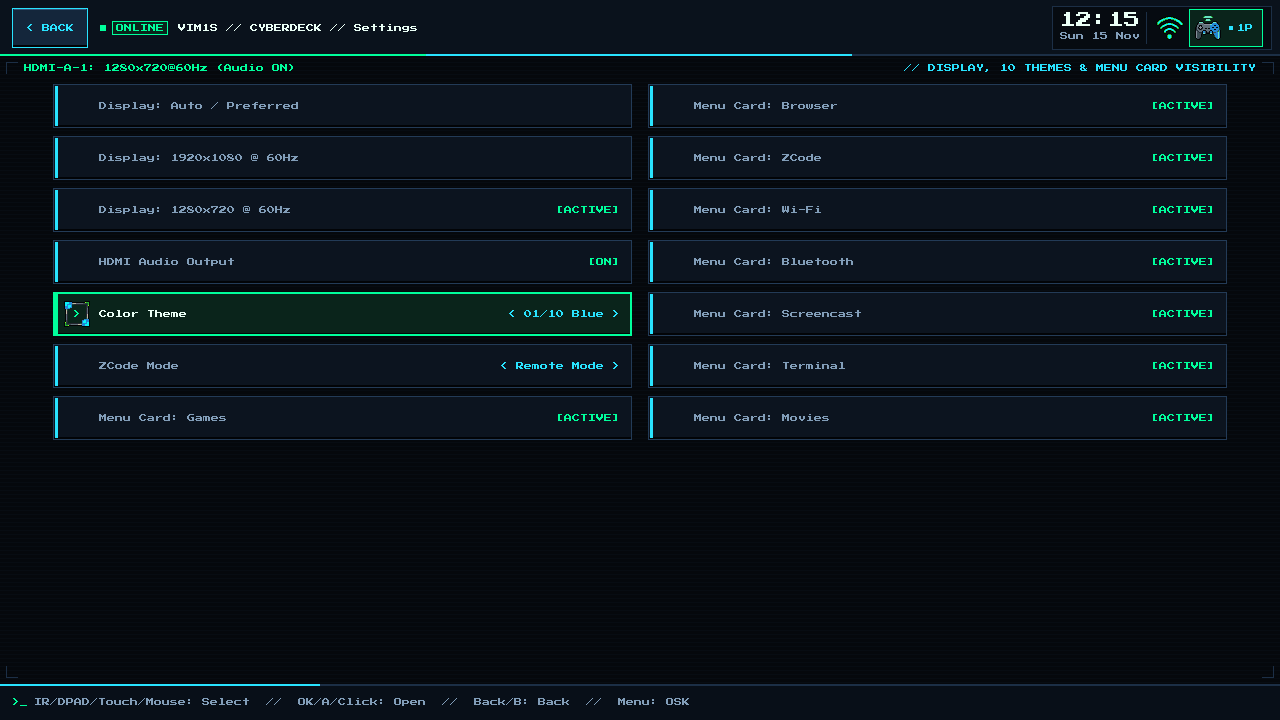
VIM1S Settings — 10 Cyberdeck Colour Themes, HDMI 1080p/720p Modes & Home Screen Customization
Make the VIM1S Console Yours — Themes, Display & Minimalist Layout
Card [7] Settings on the Khadas VIM1S Console OS puts every display, audio, theme, and home-screen preference in one clean list — navigable with a TV remote, gamepad, keyboard, or touch screen.
Every Setting Explained for Beginners
1. 10 Global Cyberdeck Colour Themes
Switching the Theme in Settings doesn't just recolor the Home Screen — ui_prefs applies your chosen palette across VIM1S Pure-ASCII Writer, VIM1S Retro MIDI Studio, VIM1S Email, and VIM1S Profile! Choose between classic Cyberdeck Phosphor Cyan/Emerald, Amber CRT Terminal, Synthwave Violet, Tactical Olive, Solarized Dark, High-Contrast Monochrome, and more.
2. HDMI Display Mode & HDMI Audio
- HDMI Resolution: Pick
Auto(EDID native),1920x1080 @ 60Hz(crisp living-room Full HD), or1280x720 @ 60Hz(ultra-snappy portable field monitors and capture cards). - HDMI Audio (
ON / OFF): Route game soundtracks, Movies audio, and MIDI Studio chiptune synthesis straight through your HDMI cable to your TV speakers or soundbar.
3. Show or Hide Any Home Screen Program ([ACTIVE] / [HIDDEN])
Building a dedicated distraction-free typewriter that only shows Writer and Email? Or a pure kids' retro console that only shows Games and MIDI Studio?
- Toggle
Menu Card: <Program>between[ACTIVE]and[HIDDEN]for any card (Browser,Wi-Fi,Bluetooth,Screencast,Terminal,Movies,Email,Profile,Writer,MIDI) — Settings itself always stays visible so you can re-enable cards anytime!
Frequently Asked Questions (Beginner FAQ)
- Where are my theme and card preferences saved?
In RAM during your session, and persisted atomically to your removable microSD card (/mnt/saves/) when present — zero writes ever touch the internal SPI NOR or eMMC chips!
Explore All Khadas VIM1S Programs — Beginner Guides
Every built-in application on the Khadas VIM1S 32 MB SPI RAM-OS runs 100% in LPDDR4 RAM with zero writes to the internal SPI NOR or eMMC chips. Everything you save is written exclusively and atomically to your removable microSD card:
- Khadas VIM1S Console OS Hub & Downloads — Download the
32 MBSPI RAM-OS (9.78 sboot), USB/eMMC image, and step-by-step flashing guide. - VIM1S Retro MIDI Studio — Visual note-based MIDI music editor & chiptune/FM synthesizer with
.mid,.wav,.mml, and.abcmicroSD export. - VIM1S Pure-ASCII Writer — Distraction-free plain-text word processor with Word-style toolbar buttons (no Markdown needed!) and
.txt,.asc,.nfomicroSD export. - VIM1S Games & Couch Launcher — Play retro ROMs and native 64-bit ARM64 strategy ports straight from RAM with crash-safe microSD savegames.
- VIM1S Movies — Hardware AV1 Player — Silent, zero-CPU
1080p60hardware video player forAV1,HEVC/H.265,VP9, andH.264movies on microSD. - VIM1S Email Client — Fast, tracking-free plain-text
IMAP / POP3 / SMTPTLS mail client with attachments and optional AI reply drafting. - VIM1S Personal Profile — Offline microSD identity and automatic signature manager with zero cloud accounts.
- VIM1S Web Browser — RAM-isolated Firefox ESR with hardware
AV1streaming, PDF reader, and couch bookmark tiles. - VIM1S Root Terminal — Built-in Wayland Linux command-line shell with a persistent microSD developer toolchain.
- VIM1S Wi-Fi Setup — Dual-band
2.4 GHz / 5 GHz(AP6256) wireless setup with encrypted0600microSD credential persistence. - VIM1S Bluetooth Pairing — Pair
Bluetooth 5.0gamepads, keyboards, and speakers in seconds. - VIM1S Wireless Screencast — Turn your TV into a low-latency Miracast wireless display receiver for phones and laptops.
- VIM1S Settings & 10 Cyberdeck Themes — Switch
1080p / 720pHDMI modes, HDMI audio, 10 CRT colour palettes, and home screen cards.