
VIM1S Games & Couch Launcher — Retro ROMs, Native 64-Bit ARM64 Strategy Ports & Zero-Flash RAM Gaming Guide
What Is the VIM1S Games Launcher? (Instant Couch Gaming From 100% RAM)
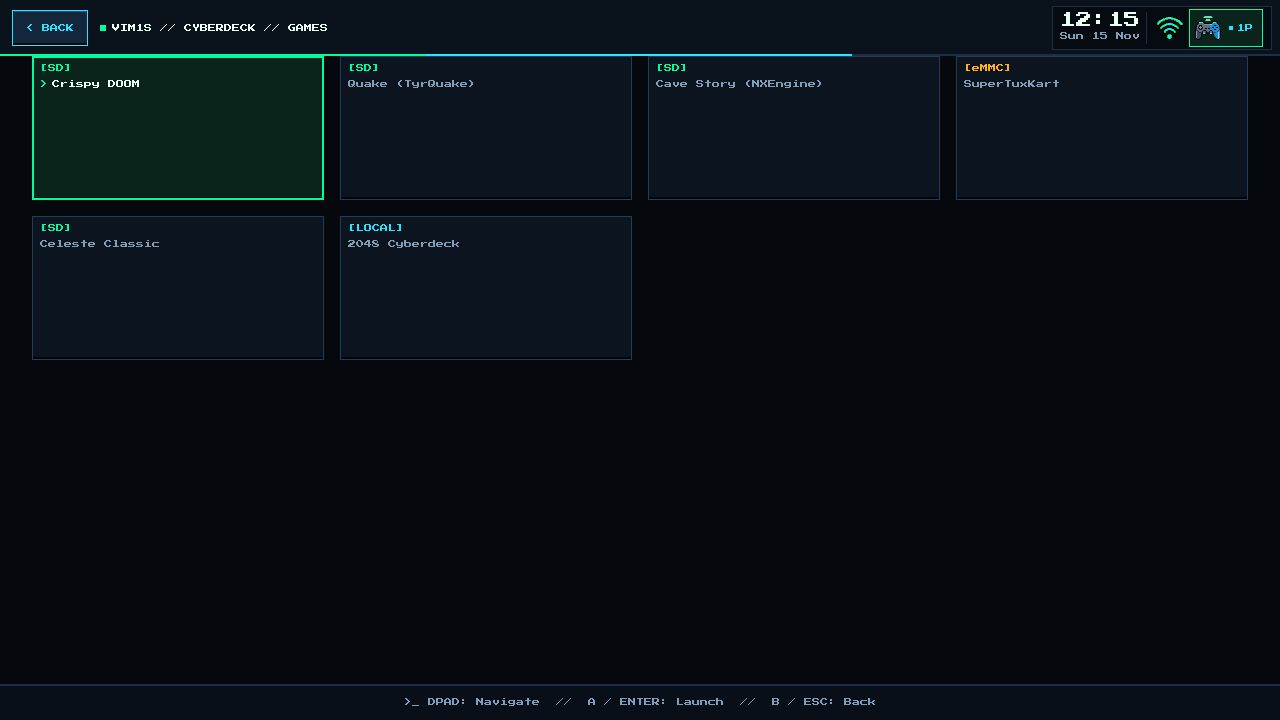
Card [1] Games on the Khadas VIM1S Console OS home screen is your central library for both native 64-bit Linux ARM64 PC game ports (such as Jagged Alliance 2, Warlords III: Darklords Rising, Arcanum, and Anno 1503) and classic Libretro console ROMs.
Unlike ordinary Raspberry Pi or Android retro boxes that constantly write logs, shader caches, and swap files onto fragile microSD cards until the card corrupts, VIM1S uses a Zero-Flash RAM Gaming Architecture:
- The OS boots into
2 GB LPDDR4RAM in9.78 seconds. - Your microSD card stays hardware-locked read-only (
blockdev --setro) before and during gameplay — pulling the USB-C power cord mid-battle cannot corrupt your card or OS! - When you launch a game, VIM1S copies the ROM or mounts the SquashFS bundle into fast RAM (
/run/roms), loads your.srm/ save folder into RAM, and only unlocks the microSD card for a split-second atomic save when you exit!
Step-by-Step Beginner Guide: How to Add Games to Your microSD Card
Step 1 — Format Any microSD Card Automatically (8 GB to 2 TB)
- Insert any blank or old microSD card into the VIM1S slot.
- VIM1S automatically formats it into a single full-capacity partition sharing 100% of the space between
/games/and/saves/, and installs the fast83.33 MHzQuad-SPIDEVFIPboot accelerator.
Step 2 — Drop Games Into the /games/ Folder
Put your microSD card into your PC or transfer files over LAN/SSH into /games/:
- For Native ARM64 Ports (
Jagged Alliance 2,Arcanum,Warlords III): Create a subfolder/games/<GameName>/containinglaunch.sh(or an executable binary matching the folder name) or drop a.sqshSquashFS bundle into/games/. - For Retro Console ROMs: Place your legally owned ROMs alongside a matching
aarch64Libretro core.soinside/games/.
Step 3 — Pick & Play With Any Controller
Re-insert the microSD card into VIM1S. A green badge on the Games card immediately displays how many titles were detected. Press A / OK / Enter (or tap the card) to open your game list and launch!
Supported Controllers & Couch Inputs
| Input Device | How It Works in VIM1S Games |
|---|---|
| Xbox / PlayStation / 8BitDo Gamepads | Plug in via USB or pair wirelessly in VIM1S Bluetooth. Supports up to 4+ local players (1P, 2P, … indicator in top bar). |
| USB / Bluetooth Mouse & Keyboard | Ideal for classic isometric strategy games (Jagged Alliance 2, Anno 1503, Arcanum). |
| Khadas Infrared (IR) Remote | Navigate menus effortlessly from the couch; toggle built-in pointer mouse mode when needed. |
| Touchscreen Monitors | Direct tap-to-launch and full touch cursor support. |
Frequently Asked Questions (Beginner FAQ)
- Where are my savegames stored, and is there a size limit?
All savegames live in /saves/ on the same unified microSD partition as /games/ — there is no tiny save partition limit, so strategy games with hundreds of megabytes of tactical quicksaves have unlimited room!
- Can I write my own indie game music or game notes right on the VIM1S?
Yes! Use VIM1S Retro MIDI Studio to export .mid and .wav soundtracks, and VIM1S Pure-ASCII Writer to write design docs or walkthrough .txt / .nfo files!
Explore All Khadas VIM1S Programs — Beginner Guides
Every built-in application on the Khadas VIM1S 32 MB SPI RAM-OS runs 100% in LPDDR4 RAM with zero writes to the internal SPI NOR or eMMC chips. Everything you save is written exclusively and atomically to your removable microSD card:
- Khadas VIM1S Console OS Hub & Downloads — Download the
32 MBSPI RAM-OS (9.78 sboot), USB/eMMC image, and step-by-step flashing guide. - VIM1S Retro MIDI Studio — Visual note-based MIDI music editor & chiptune/FM synthesizer with
.mid,.wav,.mml, and.abcmicroSD export. - VIM1S Pure-ASCII Writer — Distraction-free plain-text word processor with Word-style toolbar buttons (no Markdown needed!) and
.txt,.asc,.nfomicroSD export. - VIM1S Games & Couch Launcher — Play retro ROMs and native 64-bit ARM64 strategy ports straight from RAM with crash-safe microSD savegames.
- VIM1S Movies — Hardware AV1 Player — Silent, zero-CPU
1080p60hardware video player forAV1,HEVC/H.265,VP9, andH.264movies on microSD. - VIM1S Email Client — Fast, tracking-free plain-text
IMAP / POP3 / SMTPTLS mail client with attachments and optional AI reply drafting. - VIM1S Personal Profile — Offline microSD identity and automatic signature manager with zero cloud accounts.
- VIM1S Web Browser — RAM-isolated Firefox ESR with hardware
AV1streaming, PDF reader, and couch bookmark tiles. - VIM1S Root Terminal — Built-in Wayland Linux command-line shell with a persistent microSD developer toolchain.
- VIM1S Wi-Fi Setup — Dual-band
2.4 GHz / 5 GHz(AP6256) wireless setup with encrypted0600microSD credential persistence. - VIM1S Bluetooth Pairing — Pair
Bluetooth 5.0gamepads, keyboards, and speakers in seconds. - VIM1S Wireless Screencast — Turn your TV into a low-latency Miracast wireless display receiver for phones and laptops.
- VIM1S Settings & 10 Cyberdeck Themes — Switch
1080p / 720pHDMI modes, HDMI audio, 10 CRT colour palettes, and home screen cards.