
VIM1S Email — Fast Plain-Text TLS Mail Client (IMAP, POP3, SMTP), Attachments & AI Drafting Guide
What Is VIM1S Email? (Fast, Tracking-Free Plain-Text Email on Your Cyberdeck)
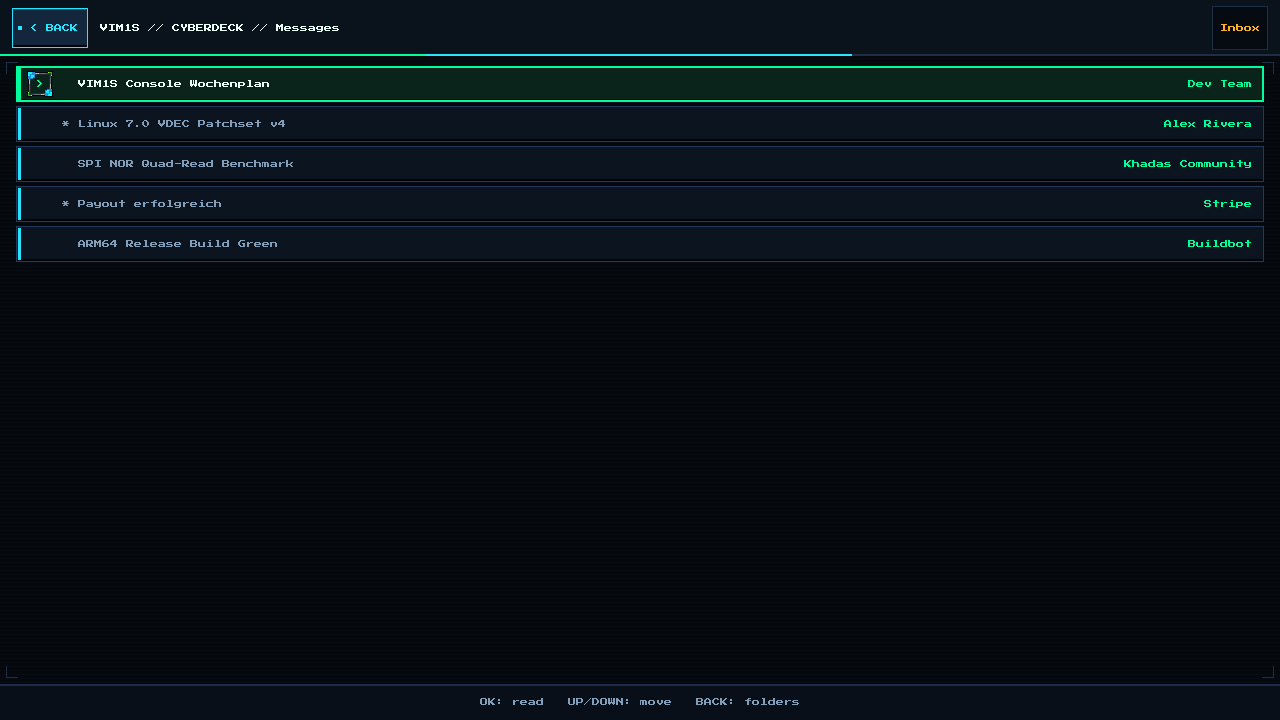
Modern webmail tabs eat over a gigabyte of RAM and execute hidden tracking pixels every time you open a newsletter. VIM1S Email (vim1s-email) — Card [10] Email on the Khadas VIM1S Console OS — is a pure C11 Wayland mail client speaking IMAP, POP3, and SMTP directly over BearSSL TLS (verified against the Mozilla root CA bundle).
Why Beginners & Privacy Fans Love VIM1S Email
- Zero Tracking Pixels: Incoming HTML emails are stripped down to clean, readable plain text in RAM — remote spy pixels never fire!
- Clickable Links & Attachments on Demand: Links inside an email are collected into an optional popup (opening in VIM1S Browser only if you choose), and file attachments can be saved to or attached from your microSD card (including
.txt/.nfodocuments from VIM1S Writer or.mid/.wavsongs from VIM1S MIDI Studio!). - Optional 1-Click ZCode AI Drafting: Toggle the
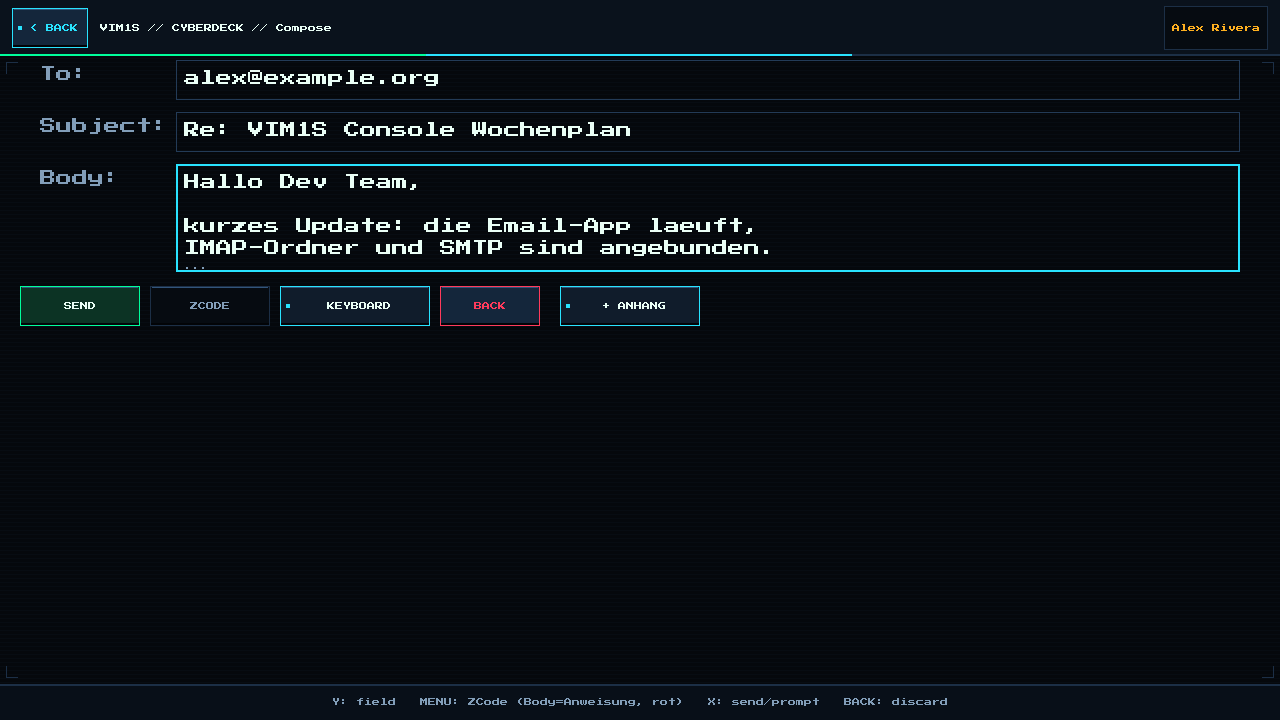
ZCODEbutton in the composer, write a short instruction ("Write a polite confirmation for Monday at 10:00"), and ZCode drafts the email using your local VIM1S Profile signature automatically!
Step-by-Step Beginner Guide: Connecting Gmail (or Any Mail Provider)
For security, Google and most modern providers use a 16-character App Password instead of your main account password. Setting it up takes two minutes (and VIM1S Email even has a built-in German HELP guide right inside the app!):
Step 1 — Create an App Password (Gmail Example)
- On your phone or PC, open
myaccount.google.com-> Security. - Ensure 2-Step Verification (2FA) is enabled, then open App Passwords.
- Enter the name
VIM1S, click Create, and note the 16-character code (without spaces).
Step 2 — Add Your Account in VIM1S Email
- Open Email on VIM1S and tap
+ KONTO/ Add Account. - Enter your details (using a USB keyboard or the built-in
KEYBOARDOn-Screen Keyboard):
- IMAP Host:
imap.gmail.com| Port:993| TLS:1 - SMTP Host:
smtp.gmail.com| Port:465| TLS:1 - Username: Your email address
- App Password: Your 16-character App Password
- Tap
SPEICHERN. Your account config and0600-protected secret are stored only on your removable microSD card (/mnt/saves/email/) — never on internal flash chips!
Frequently Asked Questions (Beginner FAQ)
- What happens if I take my microSD card out of the VIM1S?
Because zero account data or passwords ever touch the internal SPI NOR or eMMC chips, removing the microSD card leaves the VIM1S hardware 100% blank and anonymous!
- Does VIM1S Email support custom domains, Fastmail, Mailbox.org, or GMX?
Yes — any standard IMAP (993 TLS) or POP3 (995 TLS) + SMTP (465 implicit TLS / 587 STARTTLS) server works out of the box.
Explore All Khadas VIM1S Programs — Beginner Guides
Every built-in application on the Khadas VIM1S 32 MB SPI RAM-OS runs 100% in LPDDR4 RAM with zero writes to the internal SPI NOR or eMMC chips. Everything you save is written exclusively and atomically to your removable microSD card:
- Khadas VIM1S Console OS Hub & Downloads — Download the
32 MBSPI RAM-OS (9.78 sboot), USB/eMMC image, and step-by-step flashing guide. - VIM1S Retro MIDI Studio — Visual note-based MIDI music editor & chiptune/FM synthesizer with
.mid,.wav,.mml, and.abcmicroSD export. - VIM1S Pure-ASCII Writer — Distraction-free plain-text word processor with Word-style toolbar buttons (no Markdown needed!) and
.txt,.asc,.nfomicroSD export. - VIM1S Games & Couch Launcher — Play retro ROMs and native 64-bit ARM64 strategy ports straight from RAM with crash-safe microSD savegames.
- VIM1S Movies — Hardware AV1 Player — Silent, zero-CPU
1080p60hardware video player forAV1,HEVC/H.265,VP9, andH.264movies on microSD. - VIM1S Email Client — Fast, tracking-free plain-text
IMAP / POP3 / SMTPTLS mail client with attachments and optional AI reply drafting. - VIM1S Personal Profile — Offline microSD identity and automatic signature manager with zero cloud accounts.
- VIM1S Web Browser — RAM-isolated Firefox ESR with hardware
AV1streaming, PDF reader, and couch bookmark tiles. - VIM1S Root Terminal — Built-in Wayland Linux command-line shell with a persistent microSD developer toolchain.
- VIM1S Wi-Fi Setup — Dual-band
2.4 GHz / 5 GHz(AP6256) wireless setup with encrypted0600microSD credential persistence. - VIM1S Bluetooth Pairing — Pair
Bluetooth 5.0gamepads, keyboards, and speakers in seconds. - VIM1S Wireless Screencast — Turn your TV into a low-latency Miracast wireless display receiver for phones and laptops.
- VIM1S Settings & 10 Cyberdeck Themes — Switch
1080p / 720pHDMI modes, HDMI audio, 10 CRT colour palettes, and home screen cards.