
VIM1S Retro MIDI Studio — Free Note-Based MIDI Music Software, Chiptune Synth & .MID / .WAV / .MML / .ABC Guide
What Is VIM1S Retro MIDI Studio? (MIDI Music Software Made Simple for Beginners)
If you have ever searched for retro MIDI software, a chiptune music maker, or a beginner-friendly MIDI sequencer, you probably ran into two extremes: massive professional Digital Audio Workstations (DAWs) with hundreds of intimidating menus, or old-school hexadecimal trackers (C-4 01 .. F06) that look like assembly code.
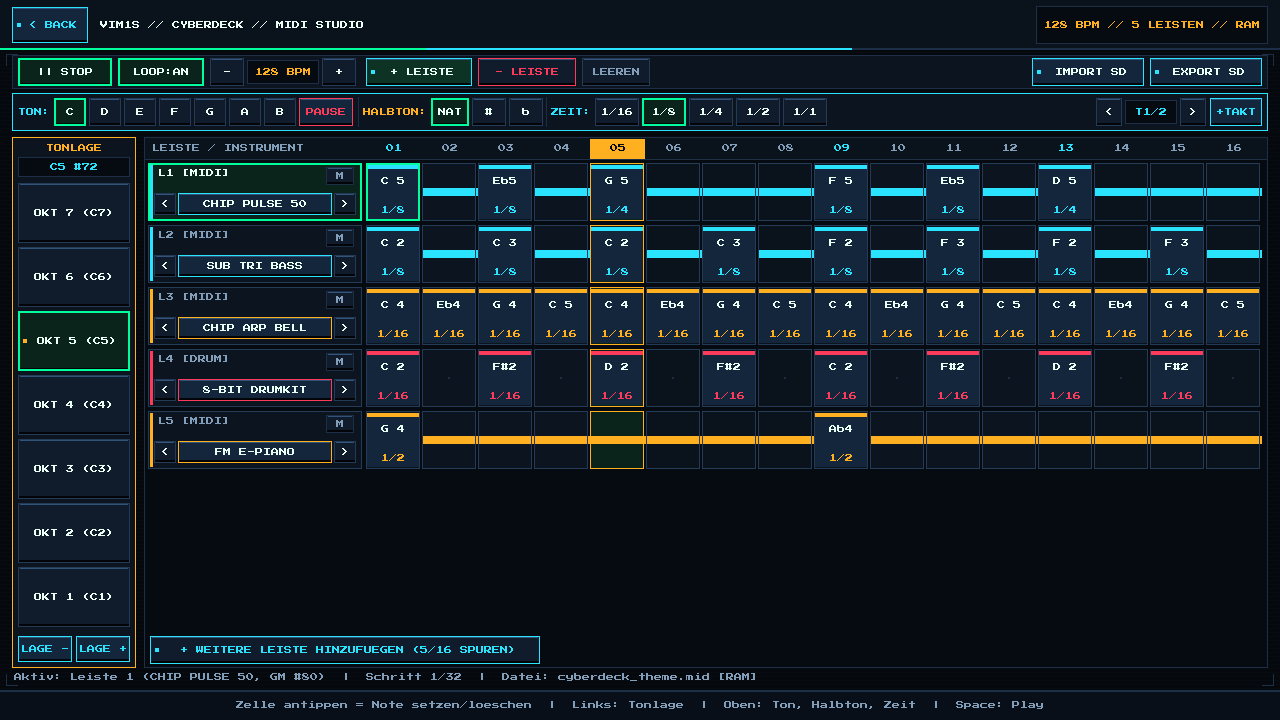
VIM1S Retro MIDI Studio (vim1s-midi) solves this completely. Built natively in pure C11 for the Khadas VIM1S 32 MB SPI RAM-OS, it is a visual, note-based multi-track music studio designed so complete beginners can compose their first retro game soundtrack or General MIDI song in under three minutes — using a touchscreen, mouse, USB keyboard, or couch gamepad.
Because VIM1S runs a 100% RAM-based operating system, the entire sequencer and built-in polyphonic 16-bit synthesizer run purely in LPDDR4 memory (zero writes to the internal SPI NOR or eMMC chips). Whenever you import or export a song, files are read from and written atomically to your microSD card (/mnt/saves/music/) in four universal formats: .mid, .wav, .mml, and .abc.
Visual Interface Tour — Every Bar & Button Explained for Beginners
You do not need to read sheet music or hexadecimal numbers to use VIM1S MIDI Studio. The screen is divided into four intuitive zones:
1. Left Vertical Bar — TONLAGE (Pitch Register / Octave 1 to 7)
On the left side of the workspace sits the vertical TONLAGE strip:
- Octaves
OKT 1 (C1)throughOKT 7 (C7): Lower numbers (OKT 1,OKT 2) produce deep bass and kick/snare drum sounds. Middle octaves (OKT 4,OKT 5) are ideal for piano, chords, and lead melodies. High octaves (OKT 6,OKT 7) sparkle for chiptune bells and arpeggios. - Live MIDI Note Readout: A glowing cyan pill at the top of the strip shows the exact note and MIDI number you have selected (for example,
C5 #72). LAGE -/LAGE +Buttons: Shift the current note or brush one octave down or up with a single tap (or shoulder buttonsL1 / R1on a gamepad).
2. Top Horizontal Bar — TON, HALBTON, and ZEIT
Right above your tracks sits the musical brush bar:
TON(C,D,E,F,G,A,B, plusPAUSE): Picks the musical note you want to place — or clears a step into a rest (PAUSE).HALBTON(NAT,#,b): Chooses whether the note is natural (NAT, white piano keys), sharp (#, one semitone higher, likeF#), or flat (b, one semitone lower, likeEb).ZEIT(1/16,1/8,1/4,1/2,1/1): Controls how long the note rings out! Longer notes automatically draw a glowing horizontal sustain bar across multiple time steps so you can see the rhythm visually.- Bar Navigator (
< T1/2 >and+TAKT): Each screen page shows16sixteenth-note steps (one4/4bar). Tap+TAKTto grow your loop from1bar up to4bars (64steps).
3. Center Stack — Unlimited Multi-Track LEISTEN (Up to 16 Instrument Lanes)
Each horizontal row (L1, L2, L3, …) is an independent musical track (Leiste):
- Per-Lane Instrument Selector (
< INSTRUMENT >): Every lane can play a different retro or General MIDI instrument simultaneously. + LEISTE/+ WEITERE LEISTE HINZUFUEGEN: Start with 4 lanes (Lead, Bass, Arp, Drums) and click+ LEISTEwhenever you want to layer more harmonies, strings, brass, or sound effects — up to 16 simultaneous MIDI tracks!M(Mute Button): Silence individual lanes on the fly to test arrangements or perform live chiptune mixes.
All 16 Built-In Retro & General MIDI Instruments
Clicking any track's instrument name opens the Retro / General-MIDI Instrument Picker (navigable by touch, mouse, keyboard arrows, or gamepad D-pad with instant live audio preview):
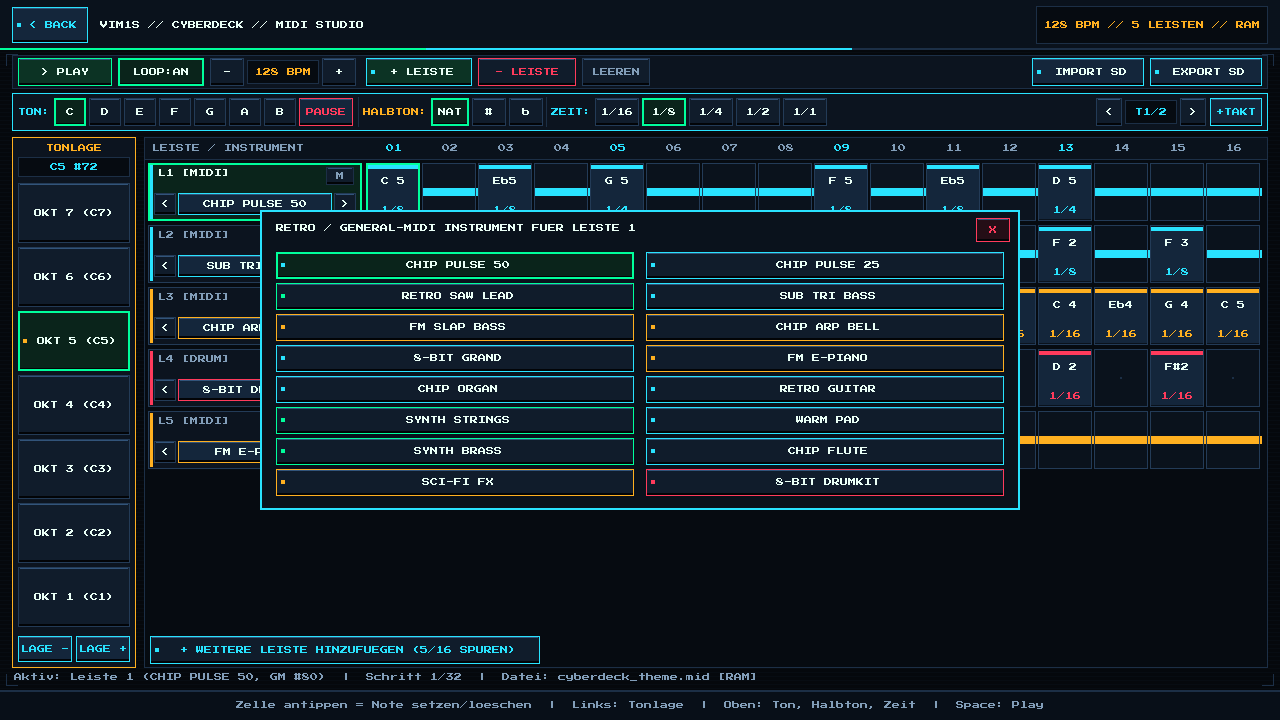
| Preset # | Instrument Name | Synthesis Engine (Built-In RAM Synth) | General MIDI Program (0–127) | Musical Role for Beginners |
|---|---|---|---|---|
| 01 | CHIP PULSE 50 | 50% Duty Square Wave (Classic NES/Game Boy Lead) | GM #80 (Square Lead) | Catchy main melodies |
| 02 | CHIP PULSE 25 | 25% Asymmetric Pulse Wave | GM #82 (Calliope Lead) | Bright, punchy counter-melodies |
| 03 | RETRO SAW LEAD | Bright Analog-Style Sawtooth | GM #81 (Sawtooth Lead) | Synthwave & arcade hooks |
| 04 | SUB TRI BASS | Authentic 4-Bit Stepped NES Triangle | GM #38 (Synth Bass 1) | Warm retro chiptune basslines |
| 05 | FM SLAP BASS | 2-Operator FM Phase-Modulated Bass | GM #39 (Synth Bass 2) | Funky 16-bit Mega Drive / AdLib bass |
| 06 | CHIP ARP BELL | 2-Operator Inharmonic FM Bell (3.5x Modulator) | GM #11 (Vibraphone) | Fast 1/16th chord arpeggios |
| 07 | 8-BIT GRAND | Crisp Pulse Piano Envelope | GM #0 (Acoustic Grand) | Chords & classical themes |
| 08 | FM E-PIANO | Warm 2.0x 2-Operator FM Electric Piano | GM #4 (Electric Piano 1) | Smooth lo-fi & RPG town harmonies |
| 09 | CHIP ORGAN | Sustained Full-Wave Organ | GM #16 (Drawbar Organ) | Gothic castle & arcade themes |
| 10 | RETRO GUITAR | 12.5% Thin Pluck Pulse Wave | GM #29 (Overdriven Guitar) | Chiptune rock riffs |
| 11 | SYNTH STRINGS | Slow-Decay Sawtooth Ensemble | GM #50 (Synth Strings 1) | Atmospheric background pads |
| 12 | WARM PAD | Soft Triangle Pad | GM #89 (Warm Pad) | Ambient intros |
| 13 | SYNTH BRASS | Punchy Saw Brass Envelope | GM #62 (Synth Brass 1) | Victory fanfares & boss themes |
| 14 | CHIP FLUTE | Pure Stepped Breath Triangle | GM #73 (Flute) | Folk & adventure melodies |
| 15 | SCI-FI FX | Long-Decay Metallic FM Sweep | GM #99 (Atmosphere FX) | Retro sci-fi transitions |
| 16 | 8-BIT DRUMKIT | Pitch-Sweep Kick (C/C#), LFSR Noise Snare (D/D#/E) & Crisp Hat (F#) | MIDI Channel 10 Percussion | Complete beat rhythm track |
Step-by-Step Tutorial: Compose Your First Retro Track in 3 Minutes
- Launch MIDI Studio: Select [13] MIDI on the VIM1S Home Screen.
- Build a Beat on Lane 4 (
8-BIT DRUMKIT):
- Select
OKT 2 (C2)on the left TONLAGE strip and1/16under ZEIT. - Select
Cunder TON and tap steps01and09on Lane 4 for your Kick Drum. - Select
Dunder TON and tap steps05and13for your Snare Drum. - Select
F+#(F#2) and tap steps03,07,11, and15for Hi-Hats.
- Add a Driving Bassline on Lane 2 (
SUB TRI BASS):
- Pick
OKT 2 (C2), duration1/8, and placeCon steps01and05,Fon09, andGon13.
- Write a Lead Melody on Lane 1 (
CHIP PULSE 50):
- Pick
OKT 5 (C5), duration1/8or1/4, and tap steps across Lane 1 (C,Eb,G,F,D). Every note auditions instantly!
- Press
> PLAY(orSpace/ GamepadX): Hear your loop live through HDMI audio or Bluetooth speakers, adjustBPM(-/+), and click+ LEISTEto addFM E-PIANOchords!
Export & Import Formats on microSD (.mid, .wav, .mml, .abc) — Zero Chip Writes
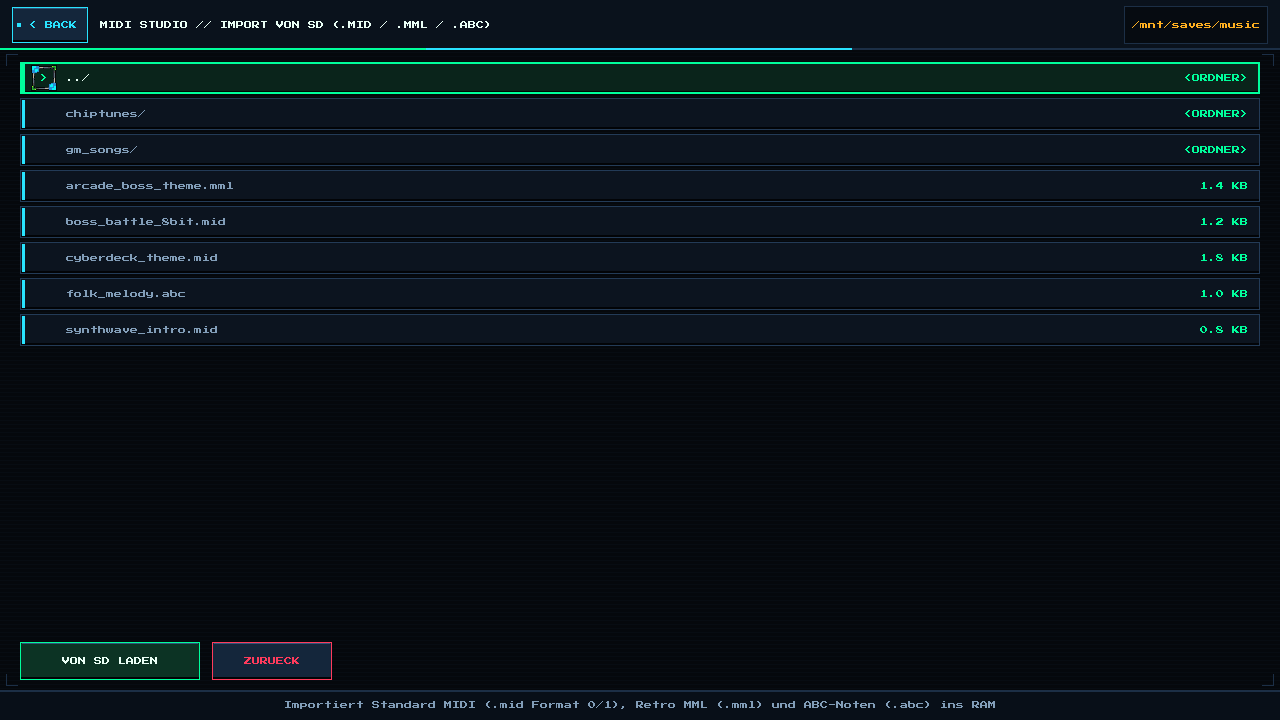
Tap EXPORT SD (Ctrl+S) or IMPORT SD (Ctrl+O) in the top right corner. Because VIM1S is a 100% RAM-OS, nothing ever writes to the internal flash chips — exports go exclusively and atomically to /mnt/saves/music/ on your microSD card:
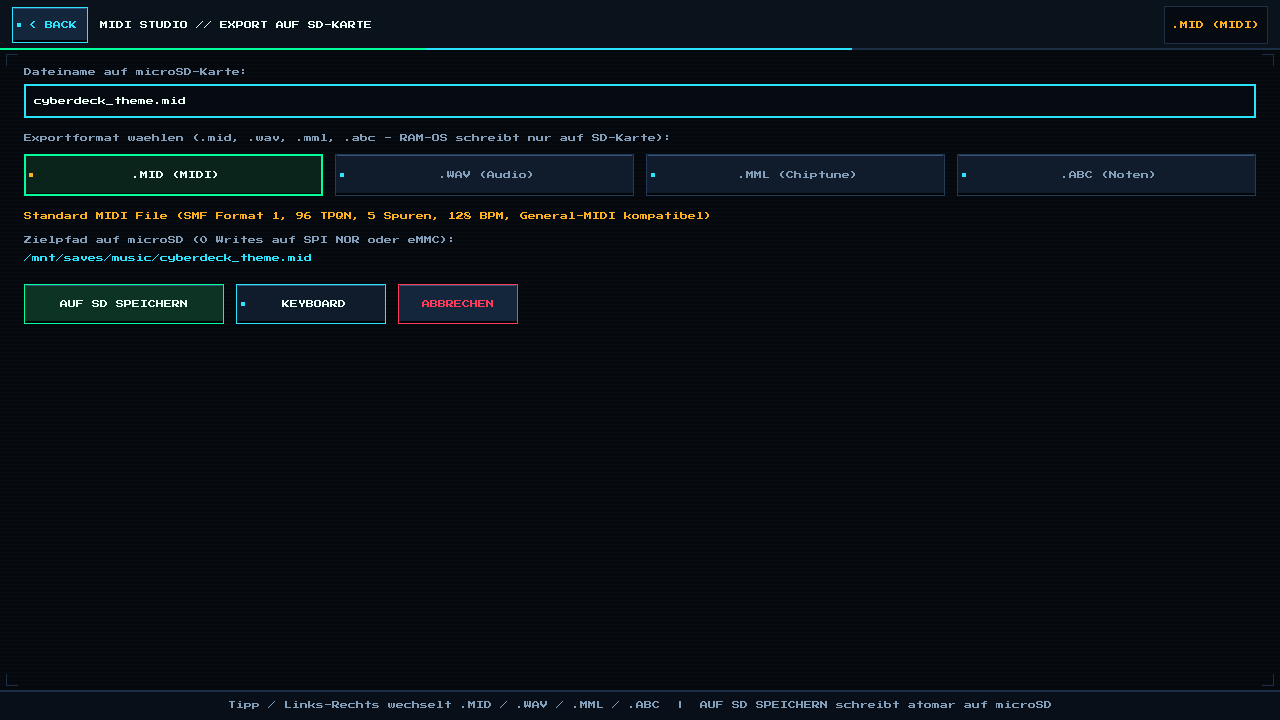
| Format | Direction | What It Is & Why It Is Awesome |
|---|---|---|
.MID (Standard MIDI) | Import & Export | Industry-standard SMF Format 1 export (96 TPQN, tempo map, General MIDI programs + Channel 10 drums) and SMF Format 0 & 1 import. Opens directly in Ableton Live, FL Studio, Logic Pro, MuseScore, Reaper, ScummVM, DOSBox, and hardware MIDI synths! |
.WAV (16-Bit Stereo Audio) | Export | Renders your song directly through the built-in VIM1S chiptune/FM synthesizer into a crystal-clear 44.1 kHz, 16-bit stereo PCM .wav audio file on microSD — ready to share on messaging apps, drop into video editors, or use directly in indie game engines (Godot, Unity, SDL2)! |
.MML (Music Macro Language) | Import & Export | Classic retro text music code (t128, @0, o5, l16, c8 e-8 g4) made famous by NEC PC-88/98, MSX, QBASIC PLAY, and Famicom/NES chiptune compilers. Edit songs as plain text in VIM1S Writer or generate melodies with ZCode AI and import them straight into MIDI Studio! |
.ABC (ABC Music Notation v2.1) | Import & Export | Clean, human-readable text sheet music (X:1, M:4/4, L:1/16, Q:1/4=128, K:C, multi-voice V:1..16, %%MIDI program). Compatible with thousands of free folk/classical .abc tune libraries online and printable sheet-music engravers! |
Controls Cheat Sheet (Touch, Mouse, Keyboard & Gamepad)
| Action | Touch / Mouse | USB / Bluetooth Keyboard | Couch Gamepad | ||
|---|---|---|---|---|---|
| Place / Clear Note | Tap any step cell | C D E F G A B / Backspace | A (Confirm) | ||
| Play / Stop Loop | Tap > PLAY / ` | STOP` | Space | X | |
Change Octave (Tonlage) | Tap OKT 7..1 or LAGE -/+ | 1–7 or - / = | L1 / R1 (Shoulder) | ||
Sharp # Accents | Tap # / b / NAT | Shift+3 (#) | Tap top bar | ||
| Cycle Instrument | Tap < / > or instrument name | [ / ] | Y | ||
| Add New Track Lane | Tap + LEISTE | Ctrl+N | START / MENU | ||
| Import / Export SD | Tap IMPORT SD / EXPORT SD | Ctrl+O / Ctrl+S | Tap top bar |
Frequently Asked Questions (Beginner FAQ)
- Does VIM1S MIDI Studio wear out my board's internal memory?
Never. Live composing, undo, and audio synthesis happen 100% in volatile RAM. Saving writes exclusively to your removable microSD card via an atomic temporary-file swap (saves_open_rw -> fsync -> saves_close_rw), leaving internal SPI NOR and eMMC at zero writes.
- Can I import a
.midfile downloaded from the internet?
Yes! Copy any .mid (Format 0 or Format 1), .mml, or .abc file into saves/music/ on your microSD card, tap IMPORT SD, and MIDI Studio automatically maps channels and General MIDI instruments onto visual lanes.
Explore All Khadas VIM1S Programs — Beginner Guides
Every built-in application on the Khadas VIM1S 32 MB SPI RAM-OS runs 100% in LPDDR4 RAM with zero writes to the internal SPI NOR or eMMC chips. Everything you save is written exclusively and atomically to your removable microSD card:
- Khadas VIM1S Console OS Hub & Downloads — Download the
32 MBSPI RAM-OS (9.78 sboot), USB/eMMC image, and step-by-step flashing guide. - VIM1S Retro MIDI Studio — Visual note-based MIDI music editor & chiptune/FM synthesizer with
.mid,.wav,.mml, and.abcmicroSD export. - VIM1S Pure-ASCII Writer — Distraction-free plain-text word processor with Word-style toolbar buttons (no Markdown needed!) and
.txt,.asc,.nfomicroSD export. - VIM1S Games & Couch Launcher — Play retro ROMs and native 64-bit ARM64 strategy ports straight from RAM with crash-safe microSD savegames.
- VIM1S Movies — Hardware AV1 Player — Silent, zero-CPU
1080p60hardware video player forAV1,HEVC/H.265,VP9, andH.264movies on microSD. - VIM1S Email Client — Fast, tracking-free plain-text
IMAP / POP3 / SMTPTLS mail client with attachments and optional AI reply drafting. - VIM1S Personal Profile — Offline microSD identity and automatic signature manager with zero cloud accounts.
- VIM1S Web Browser — RAM-isolated Firefox ESR with hardware
AV1streaming, PDF reader, and couch bookmark tiles. - VIM1S Root Terminal — Built-in Wayland Linux command-line shell with a persistent microSD developer toolchain.
- VIM1S Wi-Fi Setup — Dual-band
2.4 GHz / 5 GHz(AP6256) wireless setup with encrypted0600microSD credential persistence. - VIM1S Bluetooth Pairing — Pair
Bluetooth 5.0gamepads, keyboards, and speakers in seconds. - VIM1S Wireless Screencast — Turn your TV into a low-latency Miracast wireless display receiver for phones and laptops.
- VIM1S Settings & 10 Cyberdeck Themes — Switch
1080p / 720pHDMI modes, HDMI audio, 10 CRT colour palettes, and home screen cards.