Following our Endless New Game Plus devlog, this update focuses directly on I.M.P. mercenary creation and handheld UX in our native 64-bit C++17 & SDL2 port of Jagged Alliance 2: Arulco Revisited. All changes below were tested end-to-end on the MSI Claw handheld at native 640×480 (4:3 unstretched fullscreen, GLES2 RGB565), from New Game through tactical drop in A9: Omerta.
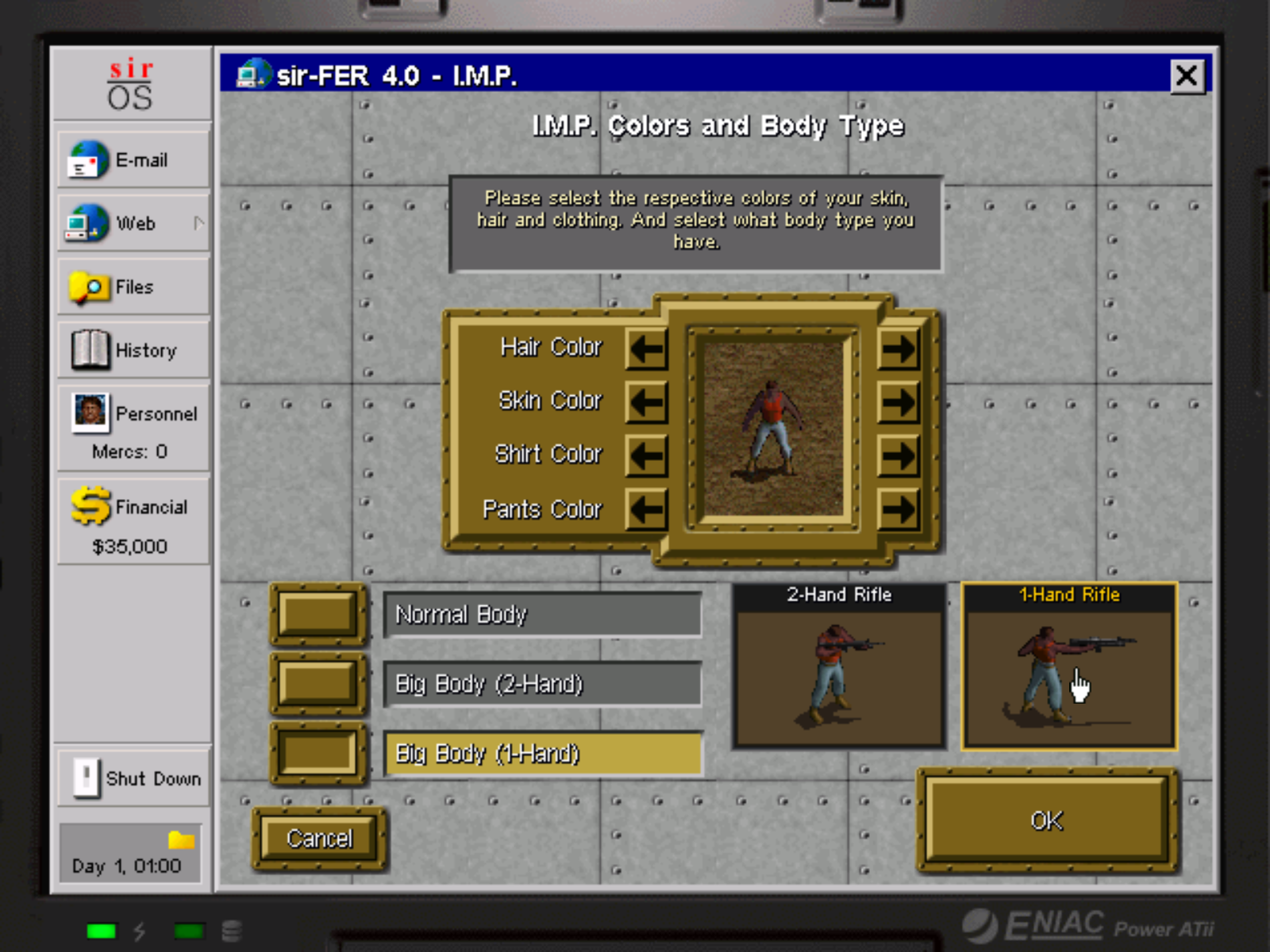
Redesigned I.M.P. Colors and Body Type captured live on the MSI Claw — three clear body/stance rows paired with clickable, palette-matched 2-Hand Rifle and 1-Hand Rifle preview cards.
1. Visual Body & Rifle Stance Selection (IMP Color Choosing.cpp)
Originally, JA2 1.13 exposed Big Body alternative rifle holding (bBadAss / SUB_ANIM_BIGGUYSHOOT2, firing long guns one-handed at full arm extension) via an unlabeled white EDITOR//SmCheckbox.sti square sitting off to the right of Big Body, with no hint of what changed in-game.
In IMP Color Choosing.cpp, we replaced that stray checkbox with an integrated three-option layout and side-by-side visual proof:
- Three native body & stance choices:
Normal Body,Big Body (2-Hand), andBig Body (1-Hand)use unifiedLAPTOP\\button_6.stitoggles andSkillTraitSmallGreyIdent.stilabel bars, andIMP Compile Character.cppnow explicitly clearsuiBodyTypeSubFlagswhen deselected. - Live palette-matched stance preview cards: Two clickable cards render directly from the engine's sprite data —
2-Hand Rifle(ANIMS\\M_MERC\\M_SR_AM2.STI) and1-Hand Rifle(ANIMS\\M_MERC\\M_SR_AIM.STI), displaying aSTR 80+requirement hint whenever 1.13's New Trait System is active. - Exact clothing/skin sync & earthy drop shadow: Both preview sprites apply your live Hair, Skin, Shirt, and Pants palette replacements on every color change and remap the raw ETRLE palette shadow index
254from bright cyan(0, 255, 255)to an earthy ground shadow so cards blend cleanly with the laptop portrait frame.
2. Classic 16-Question Questionnaire + Direct Selection Choice
JA2 1.13 disabled Sir-Tech's original 16-question psychological questionnaire (IMP Personality Quiz.cpp) in favor of picking traits directly, leaving BINARYDATA\\IMPText.EDT unused and only direct checkboxes accessible.
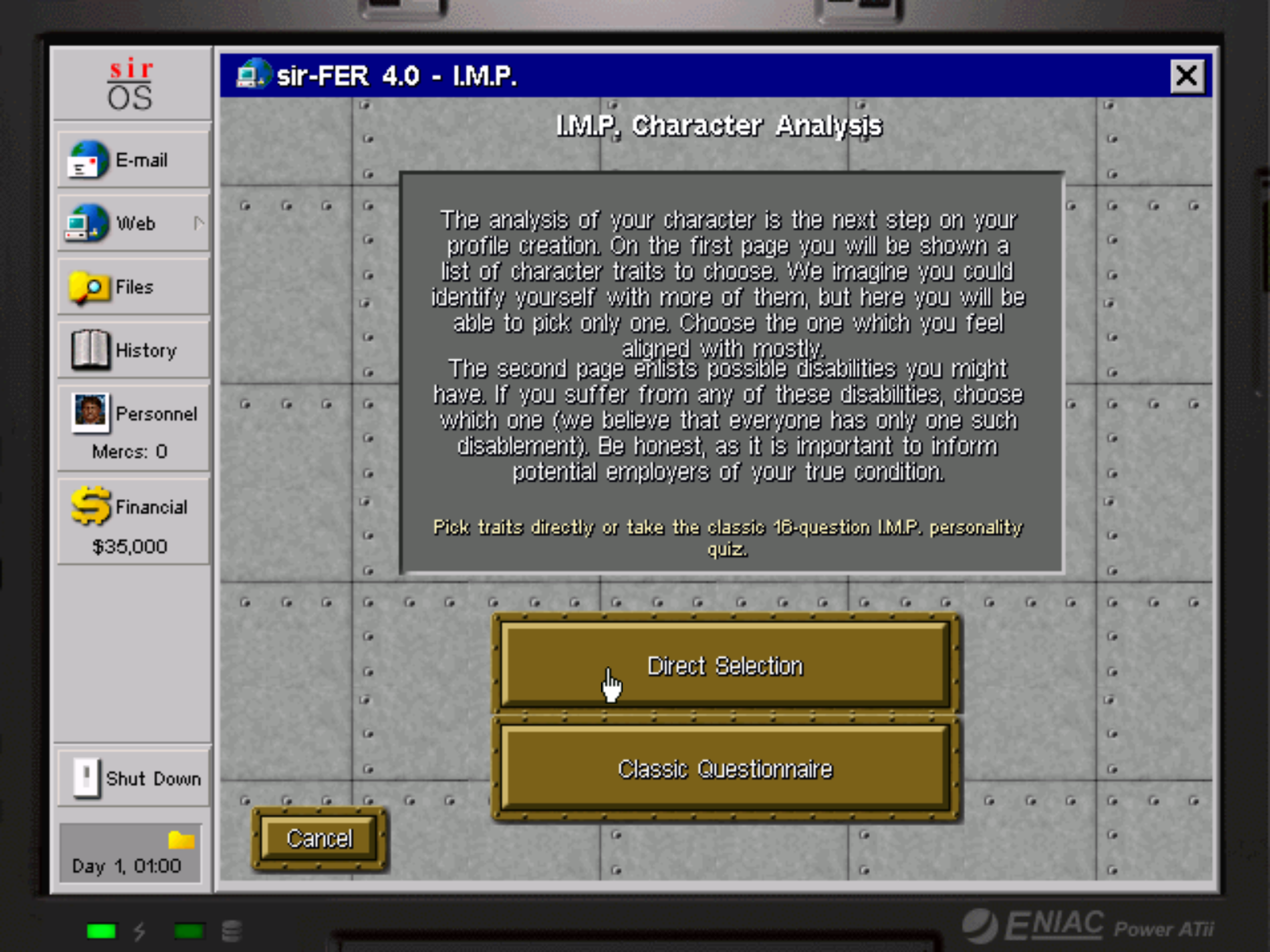
Players can choose between modern Direct Selection (picking attitudes, disabilities, and skills directly) or taking Sir-Tech's Classic Questionnaire.
Both IMP Character and Disability Entrance and IMP Personality Entrance now present explicit Direct Selection (or Select Skills) and Classic Questionnaire buttons:
- Deterministic trait & skill mapper (
imp_quiz_map.h): When you complete all 16 questions,CompileQuestionsInStatsAndWhatNot()feeds classic attitude, disability (>= 2picks), and skill accumulators throughja2n_imp_quiz::map_classic_quiz(), populating JA2 1.13'sgfCharacterTraitQuestions,gfDisabilityTraitQuestions,gfSkillTraitQuestions,gfSkillTraitQuestions2,gfMinorTraitQuestions, and Old Trait System skill lists (including demotingMartial ArtstoMelee/Hand-to-HandforBig Bodyand female mercs). - Clean state resets: Entering the quiz resets question indices and answer handles to
-1, guards button teardown, and clears stale state flags inIMP Personality Finish.cppso cancelling or re-running the quiz behaves cleanly.
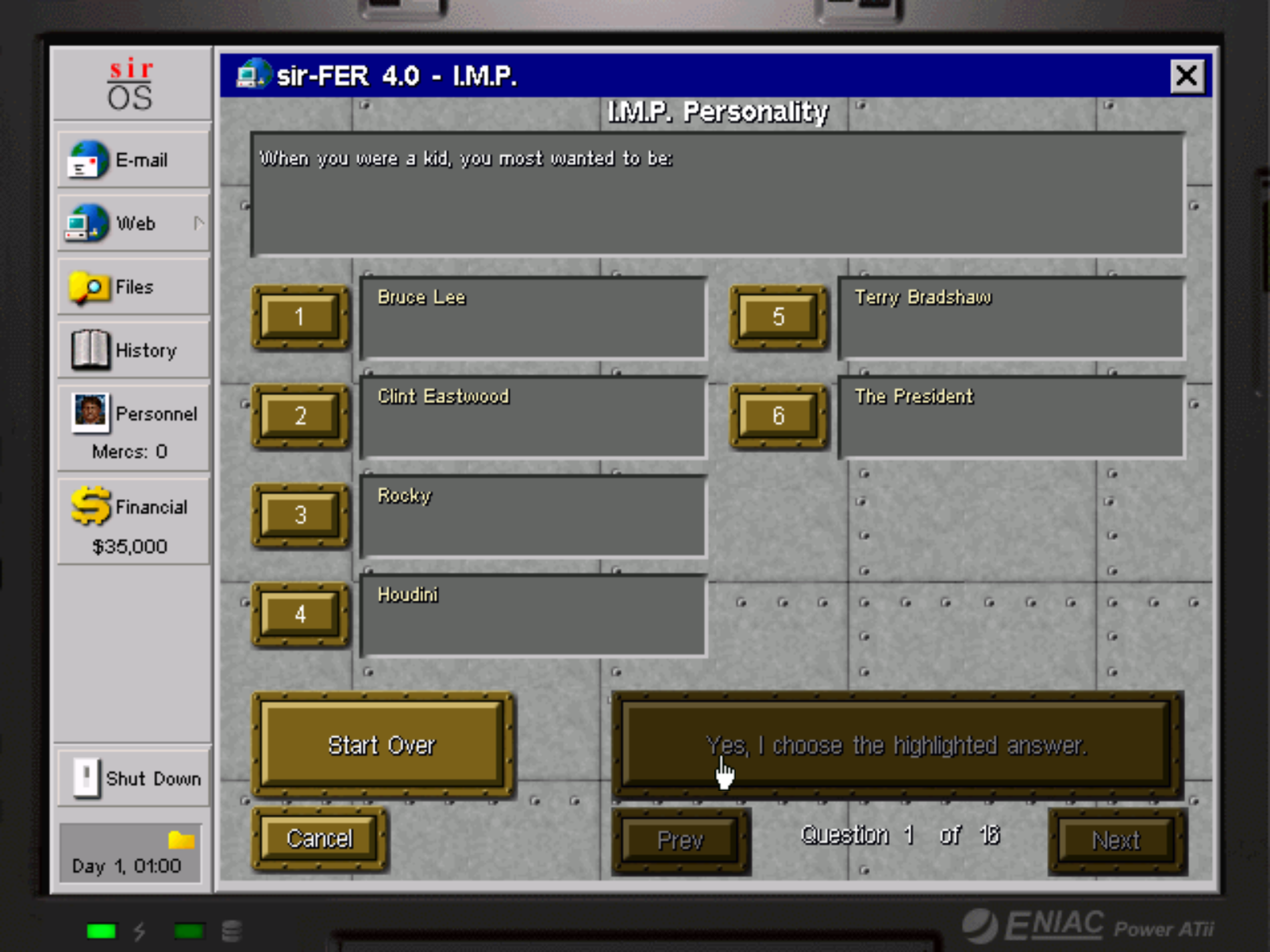
Question 1 of 16 running live inside sir-FER 4.0 — completing the 16-question run feeds traits cleanly into Attributes and unlocks New method equipment.
3. Fixing the "New method" I.M.P. Equipment Crash (IMP Gear.cpp & PMC.cpp)
Clicking New method on I.M.P. Gear Entrance previously aborted immediately in Button System.cpp:1946 (Attempting to QuickCreateButton with out of range ImageID -1) because INTERFACE\\plusminusbuttons.sti is not present in the JA2 1.13 r7609 + Arulco Revisited 1.4 asset stack.
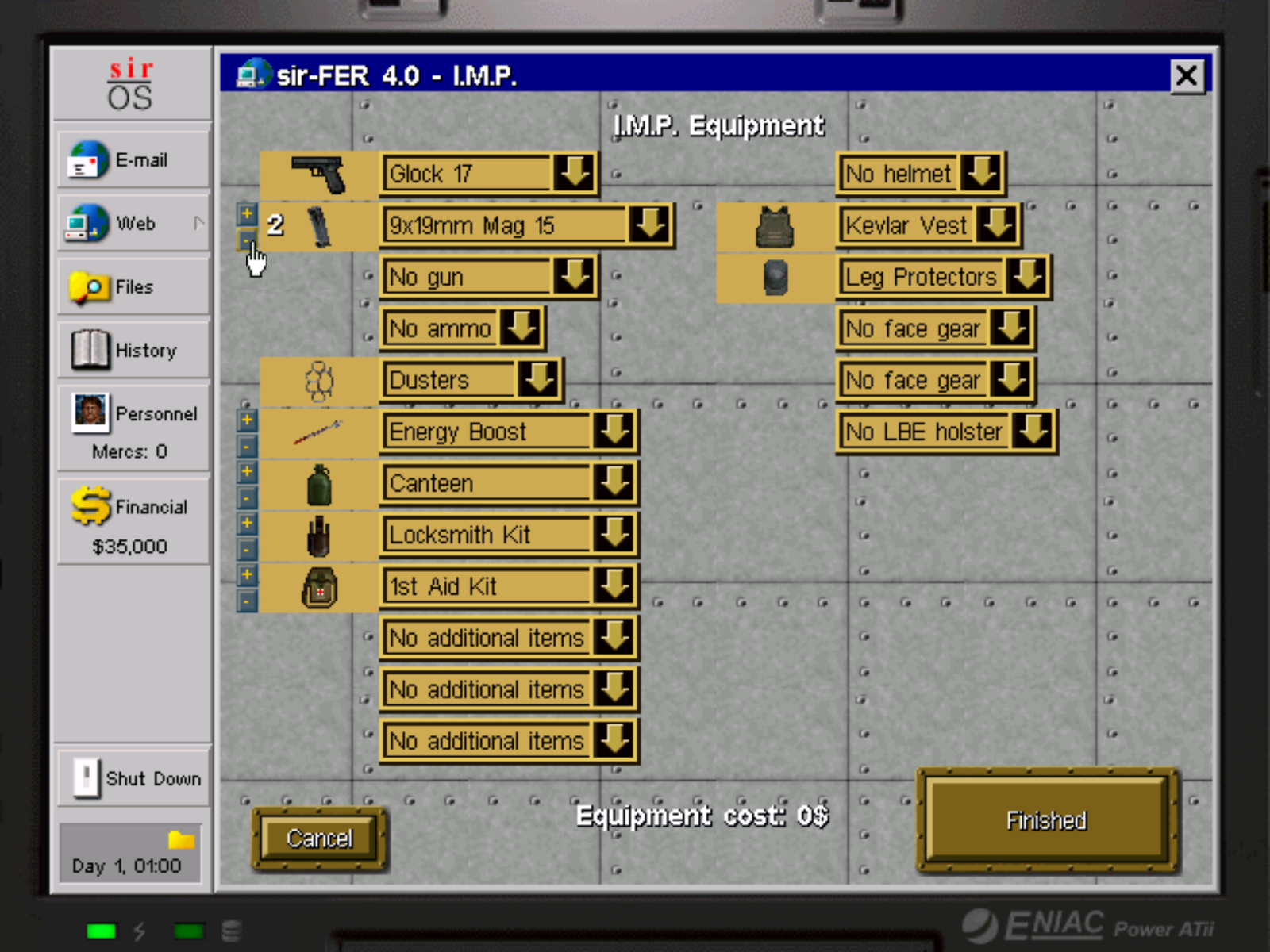
Fixed "New method" free equipment screen: native beveled + / - buttons sit cleanly to the left of each bulk item box (here adjusting 9x19mm Mag 15 to count 2) with zero missing-asset crashes.
- Native
CreateTextButtonfallback: BothIMP Gear.cppandPMC.cppnow initialize button image handles to-1, guardButtonList[...]andUnloadButtonImage(...)checks cleanly, and fall back to crisp beveled+/-text buttons positioned neatly left of the item display box whenplusminusbuttons.stiis unavailable. - Bounds-checked weapon state:
gIMPGearGun1/gIMPGearGun2lookups now validate> 0 && < MAXITEMSbefore indexingItem[].
4. Live Handheld Playtest Into A9: Omerta
To verify every path together after compiling the updated unit suite (24/24 passing, including imp_quiz_map_test), we ran automated end-to-end playthroughs on the MSI Claw handheld (4:3 fullscreen, JA2N_INPUT + Wayland grim verification):
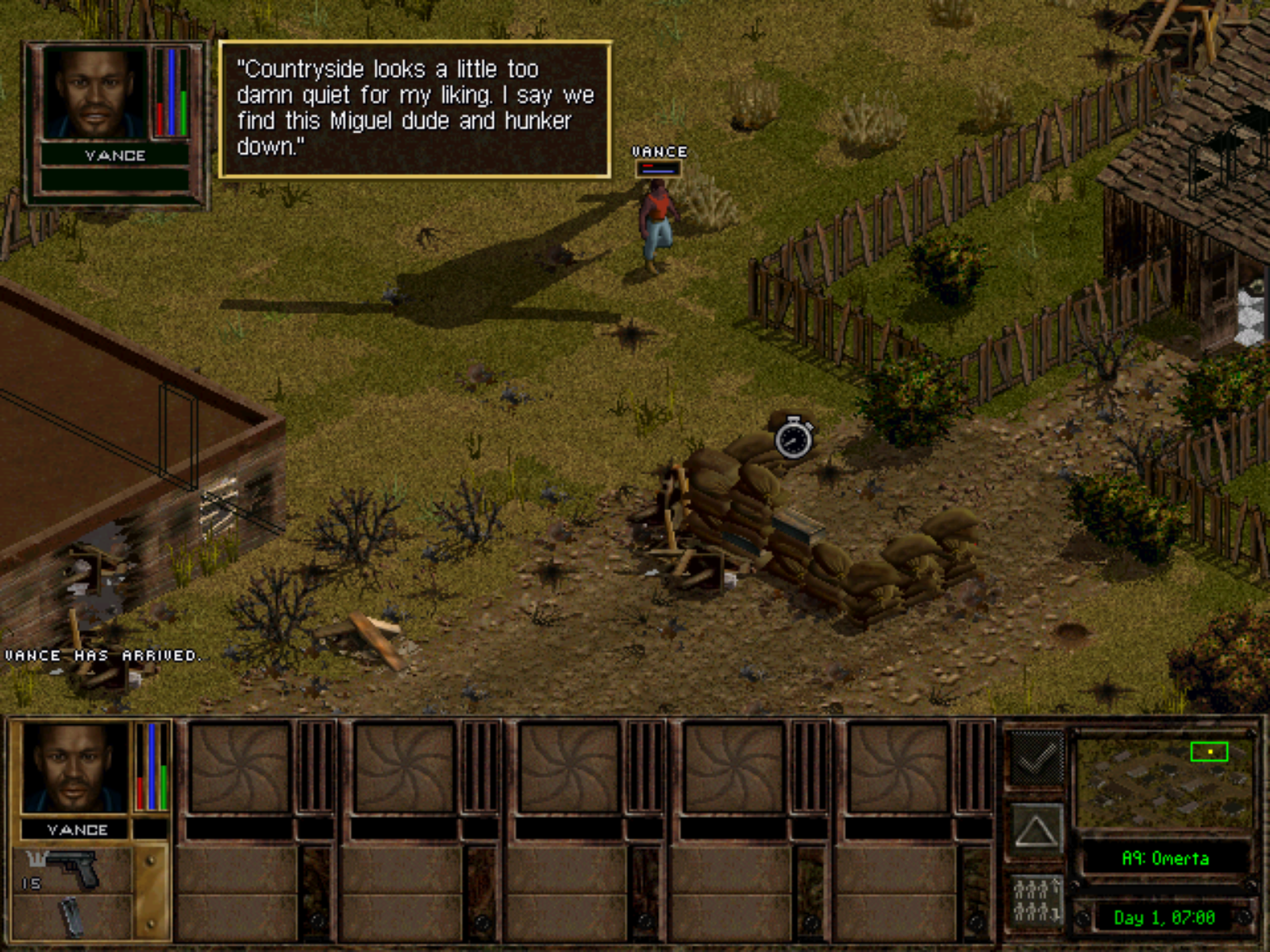
Custom Big Body I.M.P. mercenary VANCE deployed into A9: Omerta on Day 1, 07:00 with chosen red/blue colors, Classic Questionnaire traits, and New method Glock 17 loadout.
- Run 1 (Full Campaign Path): Main Menu -> New Game ->
XEP624->Big Body (1-Hand)selected via preview card ->Classic Questionnaire(all 16 questions completed ->Yes->OK) -> Attributes ->"New method"Gear (adjusted+/-on9x19mm Mag 15, confirmed zero crash) -> Paid$3,000-> Time-compressed helicopter insertion intoA9: Omertatactical movement & aiming (EXIT_CODE 0, zero assertions). - Run 2 (Direct Selection Path): Confirmed
Direct Selectionroutes cleanly intoI.M.P. Attitudes(IMP_CHARACTER_PAGE) with zero regressions.
Check the Jagged Alliance 2 Port Page for full setup instructions with your own legal GOG/CD installation of the game.